In Strategy 10 and newer versions, Health Center configuration is done using the Strategy Configuration Wizard by default. In UNIX/Linux environments where a graphical user interface (GUI) is not available, the Configuration Wizard console mode tool (mstrcfgwiz-editor) with a pre-defined Response.ini file must be used. The detail steps are outlined below:
1. Create a new Response.ini file with the necessary parameters under the section for either a Master Health Agent or a Health Agent. Refer to the Strategy System Administration Guide for a full description of response file options (available in Chapter 17 - Maintaining your Strategy System with Health Center). For example:
[HealthCenter]
HealthCenter=1
ConfigWiz-NodeType=Health Agent
ConfigWiz-InstallationPath=/home/10/Strategy10/HealthCenterInstance/HealthCenter
ConfigWiz-HomePath=/home/10/Strategy10
ConfigWiz-CommonPath=/home/10/Strategy10/install
ConfigWiz-Network-Address=YTRHEL6.techsupp.Strategy.com
ConfigWiz-Network-Port=44440
ConfigWiz-MachineCredentials-Mode=Password
ConfigWiz-MachineCredentials-Password=
ConfigWiz-KIDetectors-WebUniversal-onoff=default
ConfigWiz-KIDetectors-WebServicesUniversal-onoff=default
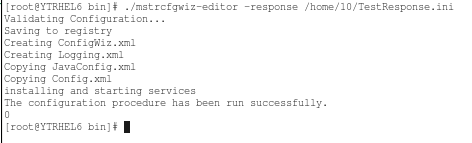
./mstrcfgwiz-editor -response /home/10/TestResponse.ini
Note: For previous versions, refer to the following tech note:
KB46833: How to configure Health Center in UNIX/Linux when a graphical user interface (GUI) is unavailable in MicroStrategy 9.4.1 and newer versions?
