SYNOPSIS:
Feature described in KB43013: New in MicroStrategy Web 9.3.1: Copy-paste data from MicroStrategy Web report grids, does not work as expected when using Strategy Web with Google Chrome browser.
SYMPTOM:
Starting in Strategy Web 9.4.1 HF3 users can use the native Copy and Paste commands (Ctrl+C, Ctrl+V) in order to copy grid cells contents to the system clipboard to be pasted elsewhere
(This feature was implemented in Strategy Web 9.3.1 but not available in Express mode until 9.4.1 HF3)
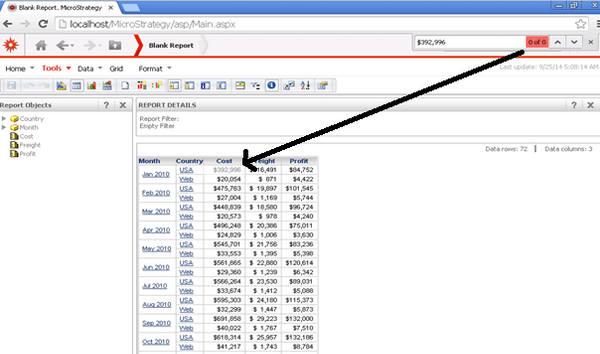
Pasted results will not be recognized when pasting data from grid cells using the Ctrl + V command in a search window created with the Ctrl + F command when opening Strategy Web using Google Chrome.
STEPS TO REPRODUCE:
1. Run an existing report using Strategy Web with Chrome browser.
2. Select a grid cell (the cell color will change).
3. Press the command Ctrl + C to copy the grid cell result
4. Press the command Ctrl + F to open the browser search box
5. Press the command Ctrl + V to paste the grid cell result to the browser search box
6. See that the pasted data is not recognized (see image)
7. Repeat the steps from 1 to 6 using Internet Explorer or Firefox browser and see the results:
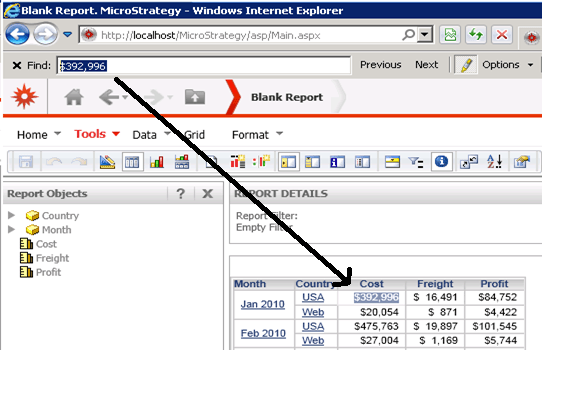
-Using Internet Explored the pasted data is recognized (see image)
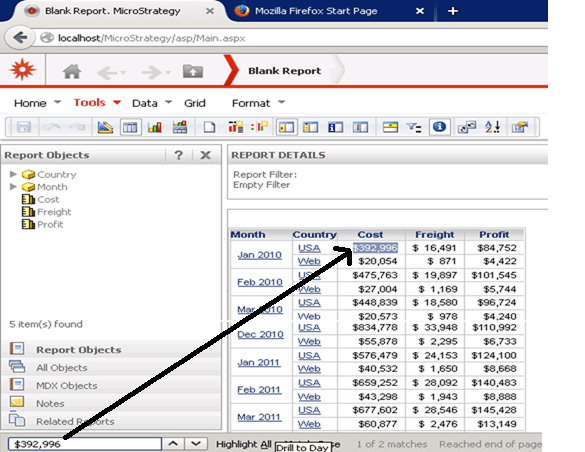
-Using Firefox the pasted data is recognized as shown below:
CAUSE:
This is a known issue in Strategy 9.3.1 and 9.4.1
This issue is addressed in Strategy 10.3. Upgrade to this version to take advantage of the fix
WORKAROUND:
Use Internet Explorer or Firefox instead of Google Chrome
