EducationSoftwareStrategy.com
StrategyCommunity

Knowledge Base

Product

Community

Knowledge Base

TopicsBrowse ArticlesDeveloper Zone

Product

Download SoftwareProduct DocumentationSecurity Hub

Education

Tutorial VideosSolution GalleryEducation courses

Community

GuidelinesGrandmastersEvents
x_social-icon_white.svglinkedin_social-icon_white.svg
Strategy logoCommunity

© Strategy Inc. All Rights Reserved.

LegalTerms of UsePrivacy Policy
  1. Home
  2. Topics

KB289619: When 'Re-run against the warehouse' is selected in the Web Preferences, refreshing a document in Presentation mode will hit cache, in MicroStrategy Web 10.1


Community Admin

• Strategy


With the introduction of Presentation mode in MicroStrategy 10.1, when a user has the setting "Re-run against the warehouse" selected and refreshes a document, the document will hit cache as opposed to re-run against the warehouse.

SYMPTOM:
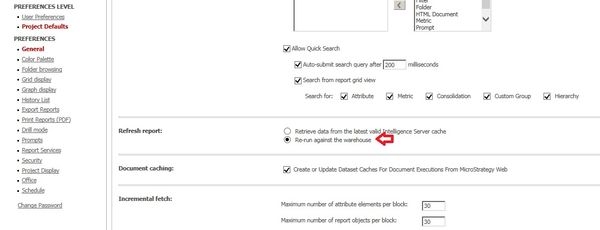
In Strategy Web 10.1, an administrator has the ability to change how reports or documents refresh, between the following two options:

  1. Retrieve data from the recent valid Intelligence Server cache
  2. Re-run against the warehouse in the Web preferences.

See the image below:

ka04W000000OfuEQAS_0EM4400000025V0.jpeg

 
With the introduction of Presentation mode in Strategy 10.1, when a user has the setting "Re-run against the warehouse" selected and refreshes a document, the document will hit cache as opposed to re-run against the warehouse.
 
STEPS TO REPRODUCE:
  • In the Strategy Web Preferences, navigate to Project Defaults > General > Refresh Report > Select 'Re-run against the warehouse'.
  • Open the document cache monitor in Strategy Developer 10.1.
  • In Strategy Web 10.1, run a document in Presentation mode.
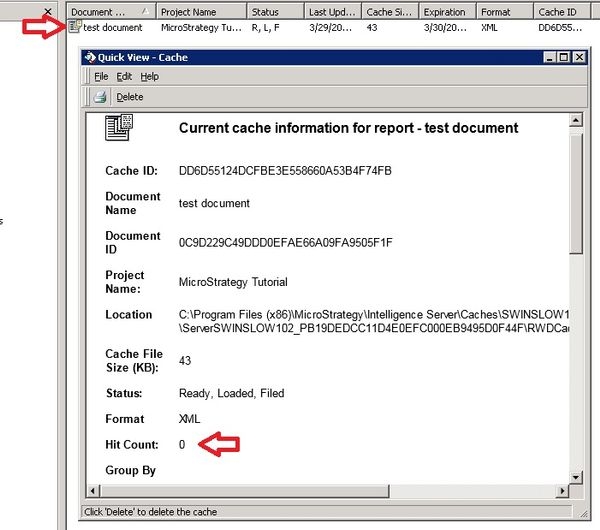
  • A cache is created in the cache monitor, as shown below:
ka04W000000OfuEQAS_0EM4400000025V3.jpeg
  • In Strategy Web 10.1, use the Refresh option from the document menu, as shown below:
ka04W000000OfuEQAS_0EM4400000025V1.jpeg
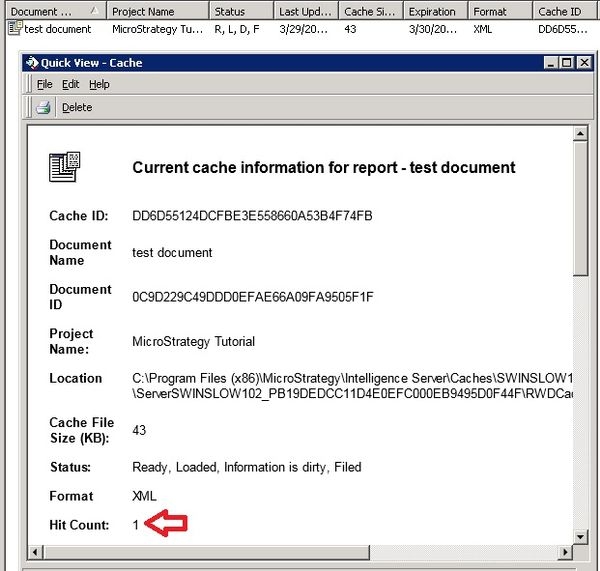
  • Refresh the cache monitor and notice that the hit count increased, as shown below:
ka04W000000OfuEQAS_0EM4400000025V2.jpeg
  • For more information regarding this Web Preference, see the first half of  tech note KB220908 and KB41323.

 
CAUSE:
This is an identified defect in Strategy Web 10.1.
 
ACTION:
This issue has been addressed in Strategy Web 10.4. Upgrade to this version to take advantage of this fix.
 
The Strategy Internal Reference Number for the issue discussed in this technical note is DE31074.


Comment

0 comments

Details

Knowledge Article

Published:

May 1, 2017

Last Updated:

May 1, 2017