EducationSoftwareStrategy.com
StrategyCommunity

Knowledge Base

Product

Community

Knowledge Base

TopicsBrowse ArticlesDeveloper Zone

Product

Download SoftwareProduct DocumentationSecurity Hub

Education

Tutorial VideosSolution GalleryEducation courses

Community

GuidelinesGrandmastersEvents
x_social-icon_white.svglinkedin_social-icon_white.svg
Strategy logoCommunity

© Strategy Inc. All Rights Reserved.

LegalTerms of UsePrivacy Policy
  1. Home
  2. Topics

KB296709: Threshold colors applied on a heat map widget do not carry over to MicroStrategy Mobile 10.2


Community Admin

• Strategy


This document shows threshold colors applied on a heat map widget do not carry over to MicroStrategy Mobile 10.2. This is fixed in MicroStrategy Mobile 10.4.

SYMPTOM
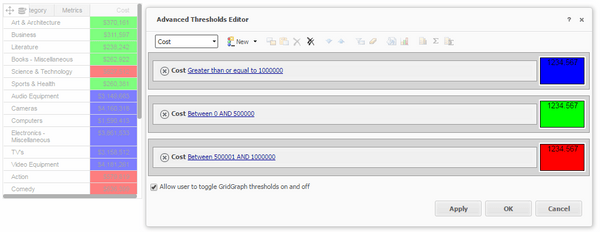
A user can define custom colors for a heatmap widget by changing the threshold of the metric in Editable mode.
Note: If there are more than 1 metrics in the heat map grid, the thresholds cannot be applied to the first metric. See the first workaround in tech note KB273192: The color of the Heat Map widget cannot be changed in Presentation mode in MicroStrategy Web 10.1 for more information.
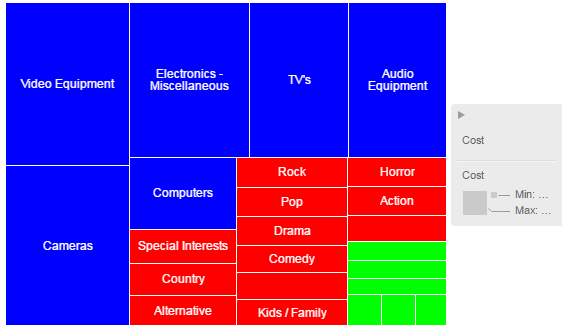
Below is an example in Strategy Web 10.2 of a heat map widget with custom thresholds:
ka04W00000148b7QAA_0EM4400000029oG.jpeg

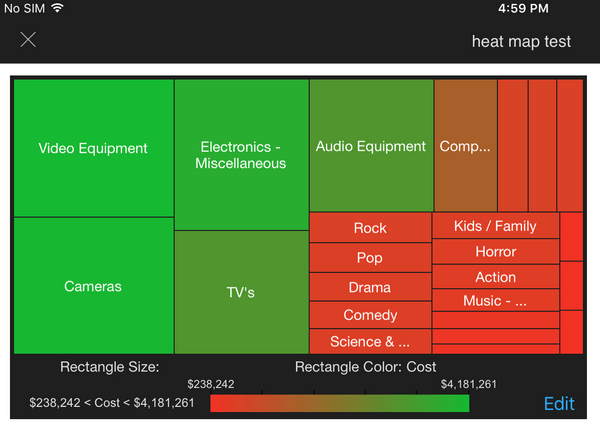
However, in Strategy Mobile 10.2, the defined colors are not considered and instead the users sees the default red to green scale as shown below:
ka04W00000148b7QAA_0EM4400000029oH.jpeg

STEPS TO REPRODUCE

  • Create a heat map widget in a report services document with one attribute and one metric.
  • In editable mode, right click the metric header and select Thresholds > Advanced.
  • Create any threshold condition that changes the fill color of the cells, as shown below:
ka04W00000148b7QAA_0EM4400000029oE.jpeg
  • Run in Strategy Web 10.2, notice the defined threshold colors appear as expected
  • Run in Strategy Mobile 10.2, notice the colors are the default colors.

 
CAUSE
This is an identified defect in Strategy Mobile 10.2.
 
ACTION
This issue is fixed in Strategy Mobile 10.4. Upgrade application to 10.4 to take advantage of the fix


Comment

0 comments

Details

Knowledge Article

Published:

April 7, 2017

Last Updated:

April 7, 2017