EducationSoftwareStrategy.com
StrategyCommunity

Knowledge Base

Product

Community

Knowledge Base

TopicsBrowse ArticlesDeveloper Zone

Product

Download SoftwareProduct DocumentationSecurity Hub

Education

Tutorial VideosSolution GalleryEducation courses

Community

GuidelinesGrandmastersEvents
x_social-icon_white.svglinkedin_social-icon_white.svg
Strategy logoCommunity

© Strategy Inc. All Rights Reserved.

LegalTerms of UsePrivacy Policy
  1. Home
  2. Topics

KB300813: In MicroStrategy 10.x When a Visual Insight Dashboard containing an ESRI Map is exported to pdf the map markers are not exported.


Community Admin

• Strategy


This KB article discusses a known issue which has been fixed starting in MicroStrategy 10.6.

Starting with the release of Strategy ONE (March 2024), dossiers are also known as dashboards.
SYMPTOM: 
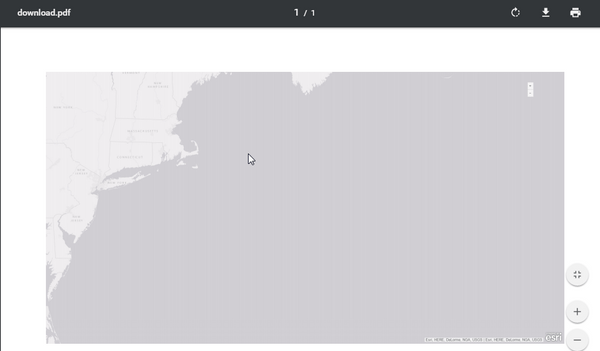
In Strategy 10.x When a user exports a Visual Insight Dashboard to PDF, the map markers are not exported along the map.
Web View:
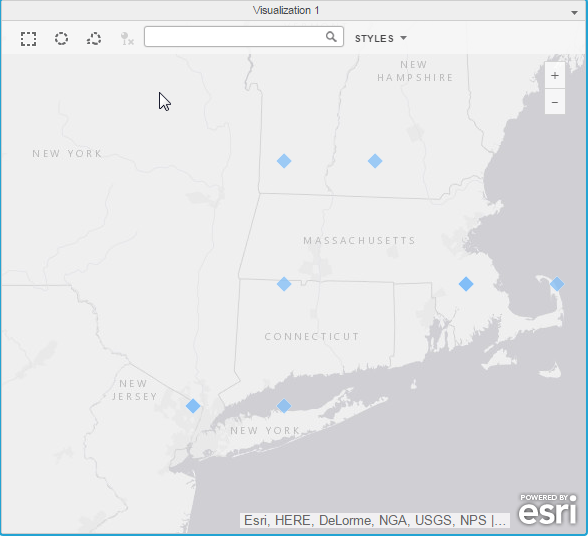
ka0PW0000001JiIYAU_0EM4400000025NH.jpeg

Export to PDF View:

ka0PW0000001JiIYAU_0EM4400000025NF.jpeg

STEPS TO REPRODUCE:

  1. Create a visual insight dashboard with data that contains a geo attribute
  2. Change the visualization to an ESRI map
  3. plot the geo attribute
  4. Notice the markers show up on the map.
  5. Export the visualization to a pdf and notice the map markers do not show up. 

CAUSE:
This is an identified defect in Strategy Web 10.x
 
ACTION:
This issue has been addressed in Strategy 10.6. Upgrade to this version to take advantage of this fix.
Related KB article: KB440764: Map markers are exported to PDF only if they have integer coordinates in Dossier 10.9
Article Reference Number: 300813


Comment

0 comments

Details

Knowledge Article

Published:

June 12, 2017

Last Updated:

March 21, 2024