In Strategy Secure Enterprise 10.x, document/dashboard (VI) execution performance can be slow or memory consumption be higher when running a document/dashboard containing multiple datasets. Also, it is verified that the project and document are configured to enable the join of data from multiple datasets.
This issue can be seen in certain documents, where the datasets have multiple common related attributes (direct or indirect relations) and the engine tries to join all these datasets to get the complete result set.
Starting with Strategy 10.2 Secure Enterprise Platform, a new VLDB setting "MCE Join To Get Data Combination" has been introduced, that can help improve the document performance.
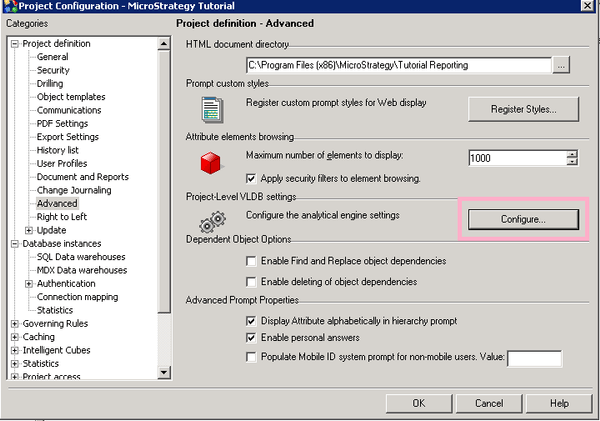
To access this VLDB, navigate to Project configuration>Project definition>Advanced>Project-Level VLDB settings>Configure the analytical engine settings, and click "Configure" as shown below:
The setting is located in the Metrics category as shown below:
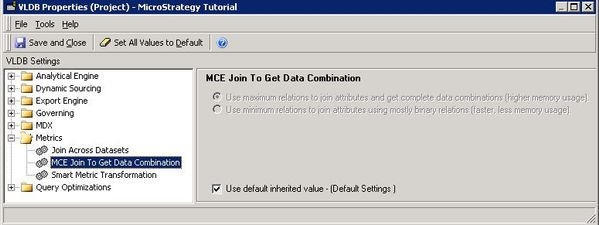
There are two options: (By default, the first option is used)
The default setting is trying to get COMPLETE data for all possible datasets by checking all possible combinations from all dataset. This setting will possibly introduce higher memory usage and slow response time.
To help with the performance issue, users should switch to the second option (referred below as MinRelation). This can help achieve better performance by not building relationships between all the attributes in the same hierarchy.
NOTE: Changing this VLDB setting at the project level requires an Intelligence Server restart.
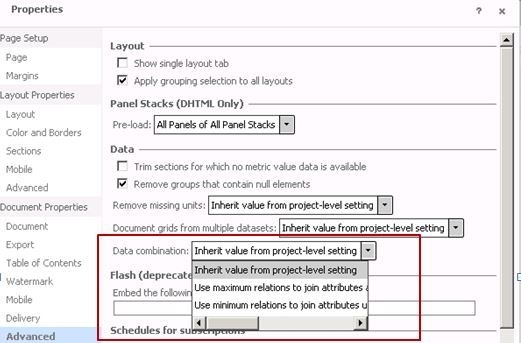
Starting with Strategy version 10.3, this setting is also available at the document level and can be accessed from Strategy Web, through the document editor as shown below.
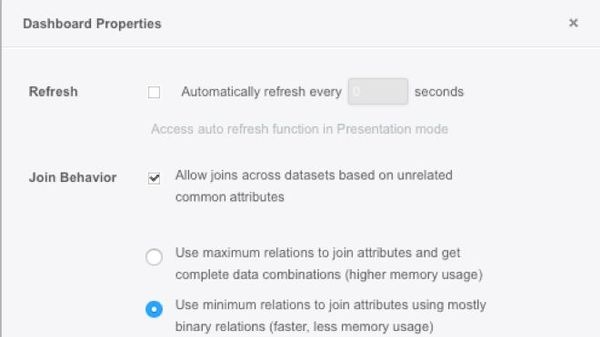
In Strategy versions 10.4 and later, this setting is also available for dashboards (VI) and can be accessed from the VI editor through the file > dashboard properties menu, as shown below:
The example below demonstrates the differences between the application of the two options of this VLDB setting.
Consider a document with three datasets as shown below:
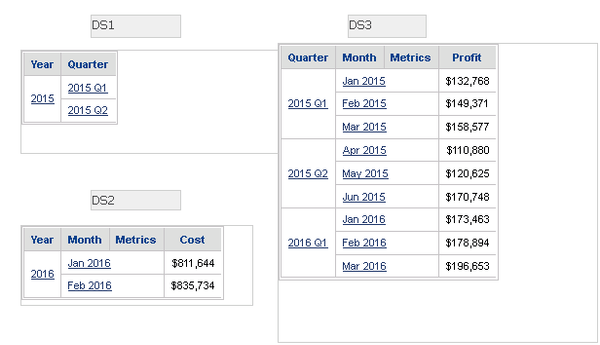
The document template results with MinRelation disabled and enabled are give below:
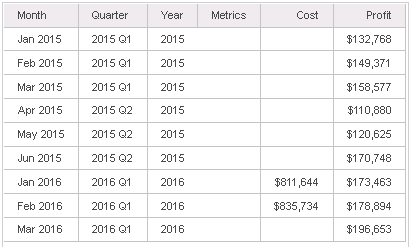
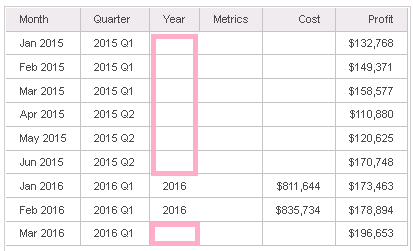
When MinRelation is enabled, some relations for Year, Quarter, Month are lost. This is because MinRelation is under the assumption that all the datasets contain complete combinations of data. In the example, if the data for <Year, Month> in DS2 and <Quarter, Month> in DS3 is complete, joining these two relations on Month can generate complete combinations for <Year, Quarter, Month>. There is no need to join DS1.
With MinRelation, MCE just join the two binary relations <Year, Month> and <Quarter, Month> on common attribute Month. High level MCE trace as shown below:
select [Month]@[MONTH_ID],
 [Month]@[MONTH_DESC],
 [Year]@[YEAR_ID],
 [Cost]
from DS2
to Ex0_tempcube0

select [Month]@[MONTH_ID],
 [Month]@[MONTH_DESC],
 [Quarter]@[QUARTER_ID],
 [Quarter]@[QUARTER_DESC],
 [Profit]
from DS3
to Ex0_tempcube1

select *
from Full Outer Join(
 Ex0_tempcube0,
 Ex0_tempcube1
 ) on Month
to Ex0_tempcube2

select [Month]@[MONTH_ID],
 [Month]@[MONTH_DESC],
 [Quarter]@[QUARTER_ID],
 [Quarter]@[QUARTER_DESC],
 [Year]@[YEAR_ID],
 [Profit],
 [Cost]
from Ex0_tempcube2
