Proper security filtering in view reports based on MicroStrategy OLAP Services 10.x Intelligent Cubes depends on the attribute(s) in the security filter being on the template of the Intelligent Cube. Security filters apply to all reports, however, and there is no guarantee that every Intelligent Cube will include security filtering attributes. MicroStrategy OLAP Services 10.x falls back to the rules described in this document to resolve possible conflicts.
The following two questions determine the resulting behavior.
The table below summarizes the behavior in each case.
| Security filter attribute is related to fact level | Security filter attribute is not related to fact level |
Security filter attribute is related to cube attribute | Report returns no data | Report returns no data |
Security filter attribute is not related to cube attribute | Suppress the metric from final results; other metrics may be displayed | Disregard the security filter qualification; present metric results normally |
Security filter attribute is related to Intelligent Cube attribute
If there is a parent-child relationship between the security filter attribute and one or more Intelligent Cube attributes, the report data cannot be evaluated. The Cube Subsetting Instruction will include a special WHERE clause qualification where 0 and the report will return no data.
Intelligent Cube structure

View report design
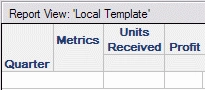
View report results
The user has a security filter Region in (South).
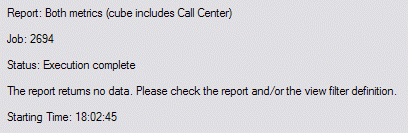
At the bottom of the View reports pseudo SQL the following statement will be seen.
where 0
The fact that the Intelligent Cube includes the Call Center attribute means that the data exists relative to Region (the security filter attribute). Thus, it would not be correct to present any cube data to the user without considering the security filter. If Region were in the Intelligent Cube, it would be no problem to apply the security filter. Without Region, the security filter cannot be evaluated and, as it would be a breach of data security to show unfiltered data to a user who requires a security filter, all results are suppressed.
In this scenario, the Intelligent Cube's report design does not fully support the reporting requirement. To obtain valid results, the cube design should be changed to be compatible with the security filter. If a cube attribute is a child of a security filter attribute, its parent(s) (Region, in this example) can also be added to the Intelligent Cube without affecting the cube's data level (assuming one-to-many relationships). Child attributes may also be added; this will lower the cube's data level, but dynamic aggregation in the Cube Subsetting Instruction should produce the desired metric results transparently to the user.
Security filter attribute is not related to Intelligent Cube attribute
If all attributes in the Intelligent Cube are unrelated to security filter attribute(s), the entry levels of facts used in the view report's metrics determine whether or not to show each individual metric.
A fact's entry level represents the hierarchies against which the fact data exist. If security filter attribute(s) have no relationship whatsoever to the fact's entry level, it means that the data exist without respect, in any way, to the security filter. Therefore, the security filter is irrelevant to the fact, and it may be ignored. For instance, a fact such as Units Received exists against Item and Month; it has no Geography referent. It would be meaningless to filter this fact by Region, and Region-level filter qualifications will be discarded both in the SQL Engine and in OLAP Services.
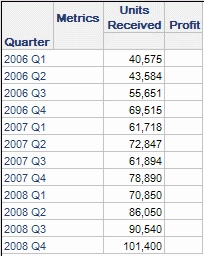
If the fact has an entry-level attribute related to the security filter, it means the underlying warehouse data are subject to the security filter. Since the security filter cannot be applied (because the attribute is not present in the Intelligent Cube), the data for this metric cannot be resolved according to the user's data security rules. Therefore, the data cannot be shown to the user. The metric is omitted from the Cube Subsetting Instruction and the column appears empty in the report results.
The following view report uses a modified version of the Intelligent Cube shown above, where the Call Center attribute has been removed. The user executing the view report has the same Region in (South) security filter.
View report results
Cube Subsetting Instruction
Note that Profit is not selected. Its entry level includes Employee, which is related to Region in the security filter.
select Quarter,
sum(units received)@{visualization level}
from Subcategory, Month, Revenue
A fact's entry level may be viewed in the fact editor, using the option Tools > Show Fact Entry Level. These are the entry levels of the facts used in the examples.
KB7295: What is the Memory Contract Manager in Strategy Intelligence Server 8.x and later? | KB7295: What is the Memory Contract Manager in Strategy Intelligence Server 8.x and later? |
Further reading
KB30696: Overview of security filter application to view reports based on Intelligent Cubes in Strategy OLAP Services 10.x
KB30711
KB30711 test link to article
