View reports against Intelligent Cubes in Strategy OLAP Services have the ability to add filtering qualifications into Cube Subsetting Instructions, including security filter qualifications. Users with different security filters can use the same Intelligent Cube data. Because the filters are applied to the master data in the Intelligent Cube during subsetting, the cube does not need any knowledge of the user security filters that will be applied later when it publishes.
The data flow for view reports built on Intelligent Cubes differs from that for standard SQL reports. For simplicity, this chart considers only one metric.
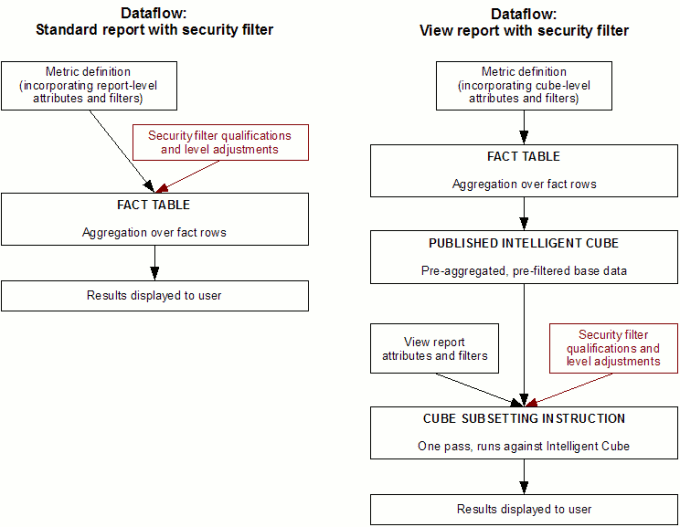
Because of the differences, security filters may evaluate differently in view reports. In a SQL report, the Strategy Engine is free to choose a different fact table to support a security filter qualification that could not be evaluated against the fact table for the metric level by itself. In the Strategy Tutorial project, for instance, if a report includes only the Category attribute, report level metrics could use the YR_CATEGORY_SLS table. A user with a security filter on Call Center would not be able to use this table because the security filter cannot be written against it.
An Intelligent Cube could omit Call Center, and the same user (with the Call Center security filter) could expect to run a view report against this cube. A view report cannot look outside its Intelligent Cube for data; therefore, the security filter cannot evaluate literally. The only options in this case are to ignore the security filter or suppress the metric entirely.
The remainder of this document covers security filter application where the filtering attribute exists in the Intelligent Cube.
Security filters for report level metrics in the Intelligent Cube
Report level metrics should include all attributes in the Intelligent Cube in their calculation during cube publishing. A security filter on an attribute included in the Intelligent Cube should appear in the Cube Subsetting Instruction's WHERE clause.
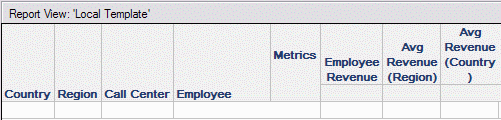
Intelligent Cube:
View report -- results for a user with a security filter Region in (South):
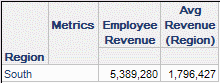
select region,
sum(employee revenue)@{},
avg(avg revenue region)@{}
from Nested aggregation metric
where region@id in (5)
Security filters for metrics higher than Intelligent Cube level
An Intelligent Cube may include metrics whose dimensionality disregards some attributes in the Intelligent Cube's base level. In the example above, the Intelligent Cube is at Employee level, but it also contains metrics at Region and Country level.
As shown above, a security filter at the same level as the dimensional metric, or at a parent level, will be included in the WHERE clause as normal. The metric results in the Intelligent Cube have enough granularity to support the filter.
When a metric group by level is higher than the security filter application level, it is not possible to break the precalculated metric values in the Intelligent Cube into the lower-level values needed for filtering. It would be incorrect to show the user metric values that include base data that should be excluded by the security filter; consequently, the metric is suppressed from the Cube Subsetting Instruction and the column is null in the displayed result. In this case, the metric 'Avg Revenue Country' is defined with standard filtering and grouping for the level 'Country.
In this example, the Region-level average metric has been replaced by a Country-level average. The metric’s group by level is Country, and the security filter application level is region. The metric's value in the Intelligent Cube takes all employees into account, not only those in the South region to which the user has access. The user should be prevented from seeing the Country-level summary value. Note that "Avg Revenue (Country)" is not even present in the SELECT clause.
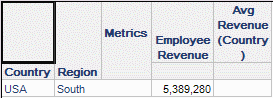
select country,
region,
sum(employee revenue)@{}
from Nested aggregation metric
where @ in (5)
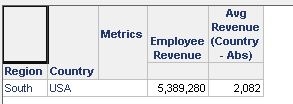
If the metric 'Avg Revenue Country' is defined with absolute filtering and standard grouping for the level 'Country', the metric at the country level is displayed to the user as shown below.
Further reading
Article Reference Number: KB99998
KB99998
