When a security filter includes more than one qualification and it is used against Intelligent Cube data, Strategy OLAP Services must determine whether the individual qualifications can be applied, and also whether the combined qualification is valid to apply.
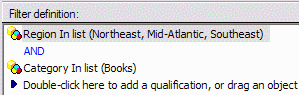
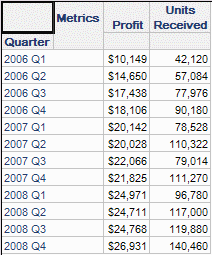
If all security filter attributes are present in the Intelligent Cube design, then all the security filter qualifications can apply directly. They will be visible in the Cube Subsetting Instruction and the view report's results will be restricted according to all qualifications.
Intelligent Cube structure

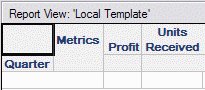
View report
User's security filter
View report results
Cube Subsetting Instruction
select [Quarter]@[QUARTER_ID],
[Quarter]@[QUARTER_DESC],
sum([Profit])@{[Quarter]},
sum([Units Received])@{[Quarter]}
from Subcategory, Month, Call Center+Region Revenue
where ([Region]@[REGION_ID] in (1, 2, 3)
and [Category]@[CATEGORY_ID] in (1))
Because both security filter attributes (Region and Category) exist in the Intelligent Cube, they are included in the WHERE clause.
Security filters on Intelligent Cubes where some security attributes are absent from the cube
Refer to the following Strategy Knowledge base document for general remarks on security filter application to Intelligent Cubes where not all of the security attributes are found.
KB30711: Security filter application to view reports based on Intelligent Cubes missing the security filter attribute in Strategy OLAP Services
When the security filter includes qualifications on different attributes, each qualification is checked individually according to the same rules:
In these examples, the same user, with the same security filter, executes the same view report definition against Intelligent Cubes with different attributes.
Intelligent Cube omitting the security filter attribute Region, but including the related attribute Call Center

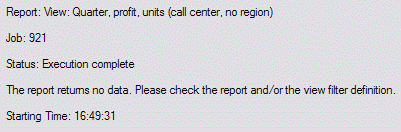
View report results:
Cube Subsetting Instruction:
"Where 0" is there because the entire security filter is assumed false.
select [Quarter]@[QUARTER_ID],
[Quarter]@[QUARTER_DESC],
sum([Profit])@{[Quarter]},
sum([Units Received])@{[Quarter]}
from Subcategory, Month, Call Center Revenue
where 0
Intelligent Cube omitting all geography attributes (unrelated to the Region security qualification)
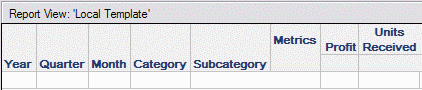
View report results:
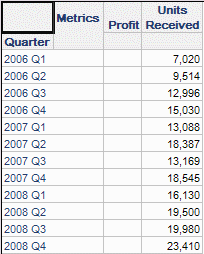
Cube Subsetting Instruction:
select [Quarter]@[QUARTER_ID],
[Quarter]@[QUARTER_DESC],
sum([Units Received])@{[Quarter]}
from Subcategory, Month, Revenue
where [Category]@[CATEGORY_ID] in (1)
In the last example, Profit values do not appear in the results because the metric is related to the security filter. The Profit fact includes Employee as an entry-level attribute, which is a child of Region. Since the Region qualification cannot apply to this cube, it would be a security breach to show Profit values without considering the Region filter.
Units Received is based on a fact whose entry-level attributes (Item and Month) are completely unrelated to Region. Therefore, it is valid to apply the Category qualification by itself to Units Received and present the filtered results. his behavior is documented in the earlier-referenced Strategy Knowledgebase document KB30711.
Further reading
KB30696: Overview of security filter application to view reports based on Intelligent Cubes in Strategy OLAP Services
