SUMMARY
This document explains the difference between the “Browse All Objects” option and the “Create New Report” option when creating a VI dashboard in Strategy Secure Enterprise 10.x.
DESCRIPTION
When creating a new VI dashboard users may notice that both the “Create New Report” option and the “Browse all Objects” option allow users to create an ad-hoc grid using existing objects in the project.
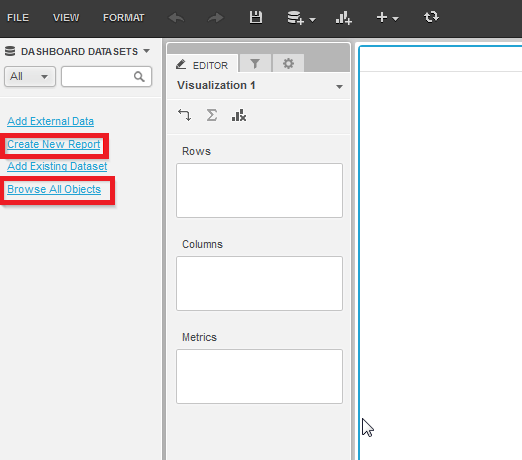
However, it may not be immediately clear what the difference between these options is.
Difference between “Create New Report” and “Browse All Objects”
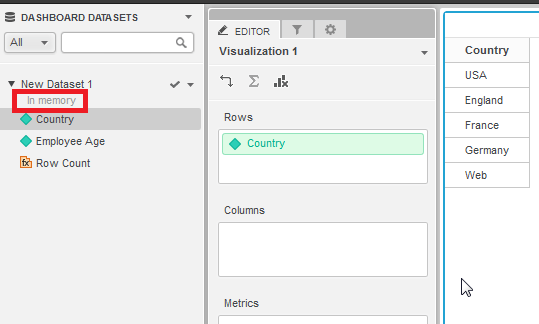
The primary difference between these options is that the “Create New Report” option will create an in-memory connection against the datasource. An in-memory connection will hold the dataset results in memory allowing for manipulation of the objects in the dashboard without re-executing the dashboard against the datasource.
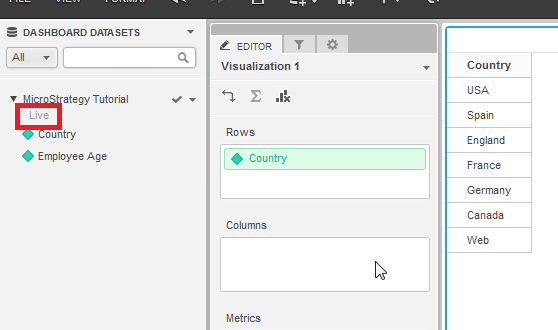
However, when the “Browse All Objects” option is selected a live connection against the datasource will be created. With live connections all manipulations of the objects within the dashboard will cause the dashboard to be re-executed against the datasource. Only a subset of the data will be fetched at a time instead of storing the entire result set in memory.
For more information on live connections refer to KB236043: New feature in MicroStrategy Web 10: Connect Live to datasource (Direct Data Access) in Data Import.
