Using Strategy OLAP Services, it is possible to apply security filters at the view report level. For information about general rules that apply when security filters are applied on view reports based on Intelligent Cubes, refer to the following Strategy Knowledge Base document:
KB30696: Overview of security filter application to view reports based on Intelligent Cubes in MicroStrategy OLAP Services
This document discusses a specific case regarding how security filters are applied when the Intelligent Cube has non-aggregatable metrics. For information about non-aggregatable metrics, refer to the following Strategy Knowledge Base document:
KB16070: How to define nonaggregatable metrics in MicroStrategy Desktop
Besides the general rules that apply when applying security filters on Intelligent Cubes, the availability of a non-aggregatable metric to a user (with security filter) depends on the relationship between the security filter attribute(s) and the attribute used in the level of the metric.
Consider an Intelligent Cube with attributes: Category, Quarter and Month and Metrics: M1, M2.
M1 = Sum([End on hand]) {~+, >|Month+} - End of hand metric, where level is defined as shown below:
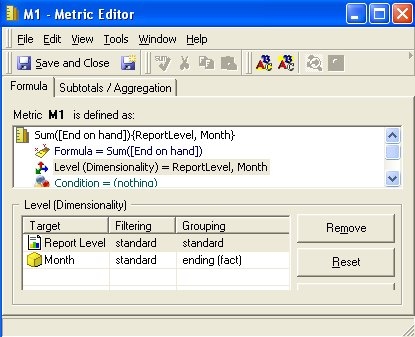
M02 = Sum([End on hand]) {~+, >|Quarter+} - End of metric, where level is defined similar to metric M1, but on the attribute Quarter.
Security filter attribute and Non-aggregatable metric level attribute are in different hierarchies
When the security filter attribute and the non-aggregatable metric's level attribute are in different hierarchies, the non-aggregatable metric is always displayed to the user.
Security filter is defined as Category = Books
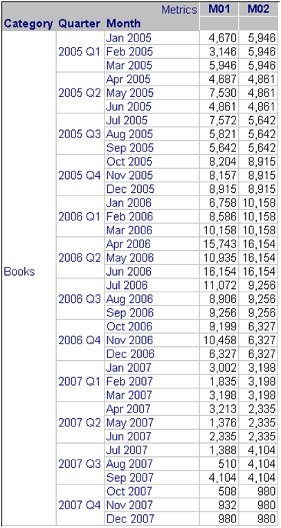
If the security filter user runs a view report with all the objects in the Intelligent Cube, both metrics M1 and M2 are diplayed for the Books category as shown below. Since the security filter attribute (Books) and the metrics' level attributes (Month and Quarter) are from different hierarchies, the metrics are displayed to the user.
Security filter attribute and Non-aggregatable metric level attribute are in the same hierarchy
When the security filter attribute and the non-aggregatable metric's level attribute are in the same hierarchy, the non-aggregatable metric is displayed to the user only if the security filter attribute is higher than or equal to the attribute in the level of the non-aggregatable metric.
Security filter is defined as Month = Jan 2007
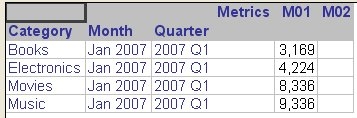
If the security filter user runs a view report with all the objects in the Intelligent Cube, only metric M1 is diplayed as shown below. The security filter user can see M1 because the non-aggregation attribute (Month) is at the same level as the security filter attribute (Month). However, the non-aggregation attribute of M2 (Quarter) is higher than the security filter attribute, thus the security filter user cannot see M2.