EducationSoftwareStrategy.com
StrategyCommunity

Knowledge Base

Product

Community

Knowledge Base

TopicsBrowse ArticlesDeveloper Zone

Product

Download SoftwareProduct DocumentationSecurity Hub

Education

Tutorial VideosSolution GalleryEducation courses

Community

GuidelinesGrandmastersEvents
x_social-icon_white.svglinkedin_social-icon_white.svg
Strategy logoCommunity

© Strategy Inc. All Rights Reserved.

LegalTerms of UsePrivacy Policy
  1. Home
  2. Topics

KB310040: When selecting the Metric Option link in MicroStrategy Web when trying to create a new metric, the error "i.getResponseHeader is not a function" shows in MicroStrategy Web 10.x.


Community Admin

• Strategy


When selecting the Metric Option link in MicroStrategy Web when trying to create a new metric, the error "i.getResponseHeader is not a function" shows in MicroStrategy Web 10.x.

SYMPTOM:
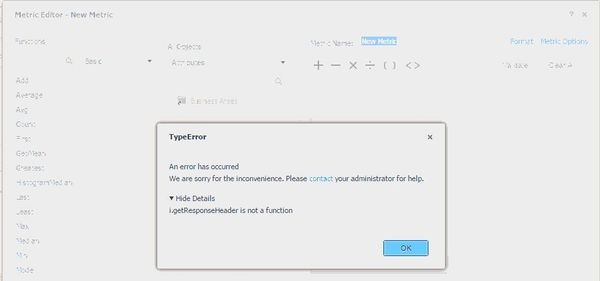
When trying to create a new metric, choosing the Metric option link in the Metric Editor in Web, the error "i.getResponseHeader is not a function" shows.
 

ka04W000000OftaQAC_0EM4400000025ST.jpeg


i.getResponseHeader is not a function

 
 
STEPS TO REPRODUCE:

    1. Open Web and go to the Enterprise Analytics project.
    2. Select the option to Create a metric.
    3. Notice the loading circle stays for up to a few minutes before any folders are shown.
    4. Click on the Metric Options link.
ka04W000000OftaQAC_0EM4400000025SR.jpeg
    • Notice the error "i.getResponseHeader is not a function" shows.

CAUSE:
In this particular scenario, the issue happened due to the large amount of attributes in the project (more than 6,000). The call to the server for this feature requires loading all of these objects into memory and the RAM for the Object Server was very low for this particular project.
ACTION:
Increase the Server side and Client side cache for Object Server to 2-4GB, per tech note KB14815: What are the different settings governing server-side object cache usage in MicroStrategy Intelligence Server 8.x


Comment

0 comments

Details

Knowledge Article

Published:

June 1, 2017

Last Updated:

June 1, 2017