EducationSoftwareStrategy.com
StrategyCommunity

Knowledge Base

Product

Community

Knowledge Base

TopicsBrowse ArticlesDeveloper Zone

Product

Download SoftwareProduct DocumentationSecurity Hub

Education

Tutorial VideosSolution GalleryEducation courses

Community

GuidelinesGrandmastersEvents
x_social-icon_white.svglinkedin_social-icon_white.svg
Strategy logoCommunity

© Strategy Inc. All Rights Reserved.

LegalTerms of UsePrivacy Policy
  1. Home
  2. Topics

KB31137: Grand total displays disappear from the grid when selected as the target of a selector in MicroStrategy Web


Community Admin

• Strategy


SYMPTOM
Grand totals become unavailable when a grid report with all subtotals displayed is viewed in a dashboard with a selector pointing to the grid.
This is an example of a report with subtotals and a Grand Total:

ka04W00000148KQQAY_0EM4400000028GB.jpeg

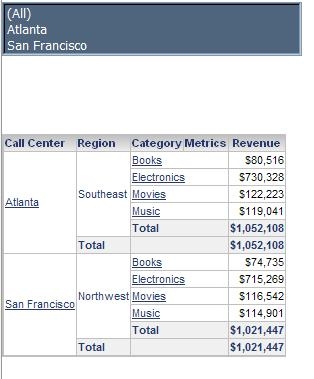
This is the same dataset in a dashboard with a selector targeting the grid:
ka04W00000148KQQAY_0EM4400000028GT.jpeg

Notice that there is no grand total row in the grid.
 
CAUSE
This is a known issue with Strategy Web 9.x and above. Some custom subtotal could be also impacted by this issue as well in addition to Grand Total.
 
ACTION
This issue has been addressed in Strategy Web 9.0.1 with the introduction of the setting "Apply selections as filter". Enable this check box in Selector's properties, as shown below:

ka04W00000148KQQAY_0EM4400000028GU.jpeg

WORKAROUND
Enable the Total option for the selector which will create a new option in the selector called Total.

ka04W00000148KQQAY_0EM4400000028GS.jpeg

Note: Refer to the following tech notes for more information on this setting: KB30151 and KB30185.


Comment

0 comments

Details

Knowledge Article

Published:

October 31, 2018

Last Updated:

October 31, 2018