EducationSoftwareStrategy.com
StrategyCommunity

Knowledge Base

Product

Community

Knowledge Base

TopicsBrowse ArticlesDeveloper Zone

Product

Download SoftwareProduct DocumentationSecurity Hub

Education

Tutorial VideosSolution GalleryEducation courses

Community

GuidelinesGrandmastersEvents
x_social-icon_white.svglinkedin_social-icon_white.svg
Strategy logoCommunity

© Strategy Inc. All Rights Reserved.

LegalTerms of UsePrivacy Policy
  1. Home
  2. Topics

KB31330: Unable to cluster MicroStrategy Intelligence Servers 9.0.0 via the Administration menu in MicroStrategy Desktop 9.0.0


Community Admin

• Strategy


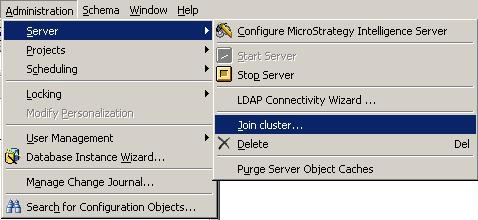
In MicroStrategy 9.0.0, users have the ability to cluster Intelligence Servers not only via the Cluster Monitor (as in MicroStrategy 8.1.x) but also through the Administration Menu available in MicroStrategy Desktop as seen below:

INTRODUCTION:
In Strategy 9.0.0, users have the ability to cluster Intelligence Servers not only via the Cluster Monitor (as in Strategy 8.1.x) but also through the Administration Menu available in Strategy Desktop as seen below:
 

ka04W00000148WwQAI_0EM440000002B0s.jpeg


SYMPTOM:
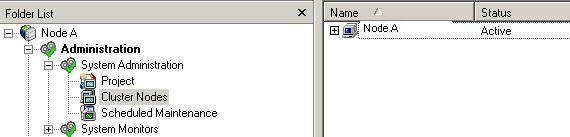
Using the setting above, an administrator clusters two Strategy Intelligence Servers 9.0.0. After this, the administrator checks the cluster monitor in Strategy Desktop 9.0.0, but only the local node will be displayed.
 
STEPS TO REPRODUCE:

  • Log into a 3-tier project source in Strategy Desktop 9.0.0 as administrator. Call it Node A.
  • Click on Administration menu -> Server -> Join Cluster and the following screen comes up:
ka04W00000148WwQAI_0EM440000002B0q.jpeg
  • Enter the name of the Intelligence Server to join Node A. Call it Node B.
  • Go to Node A's Cluster monitor under System Administration and notice Node B does not appear:
ka04W00000148WwQAI_0EM440000002B0p.jpeg

 
CAUSE:
This is a known issue in Strategy Desktop 9.0.0.
 
ACTION:
This issue is addressed in Strategy 9.0.1 where the option to "Join Cluster" is disabled unless the user navigates to Administration ->System Administration ->Cluster Nodes. Upgrade to this version to take advantage of the fix.
 
WORKAROUND:
Administrators can choose one of the following options to cluster Strategy Intelligence Server nodes: 

  1. Use the method that exists in Strategy 8.1.x - Go to System Administration and right mouse click on Cluster Nodes to select Join Cluster. Enter the name of the Intelligence Server (Node B) to join Node A in the cluster.
  2. Before selecting the Join Cluster option from the Administration menu, highlight Cluster Nodes within System Administration and then proceed to the Administration menu ->Server ->Join Cluster.

For details on clustering configuration and setup, refer to the following Strategy Technical Document:
 
KB6022 - Strategy Intelligence Server Cluster Configuration Guide
KB16018 - Strategy Intelligence Server Clustering FAQ


Comment

0 comments

Details

Knowledge Article

Published:

May 11, 2017

Last Updated:

October 3, 2019