SYMPTOM:
Some users in Strategy Web would like to keep their session logged in for an extended period, for example, one hour. Even when Strategy is configured to allow user sessions to remain open longer than an hour, the web session is still terminated and the user is logged out after being idle for less than one hour. Refer to the following technote for more information on time out settings in Strategy Web:
KB12867: How timeout settings in MicroStrategy Web and the MicroStrategy Intelligence Server affect users in MicroStrategy Web
The user will notice that the session has ended by receiving the login page when going back to Strategy Web.
CAUSE:
This issue is caused by the Performance and Recycling settings for Application Pools in IIS causing the session timeout even though the other parameters are set to a longer duration.
ACTION:
Follow the steps below to prevent the IIS Application Pools setting from timing out the session prematurely:
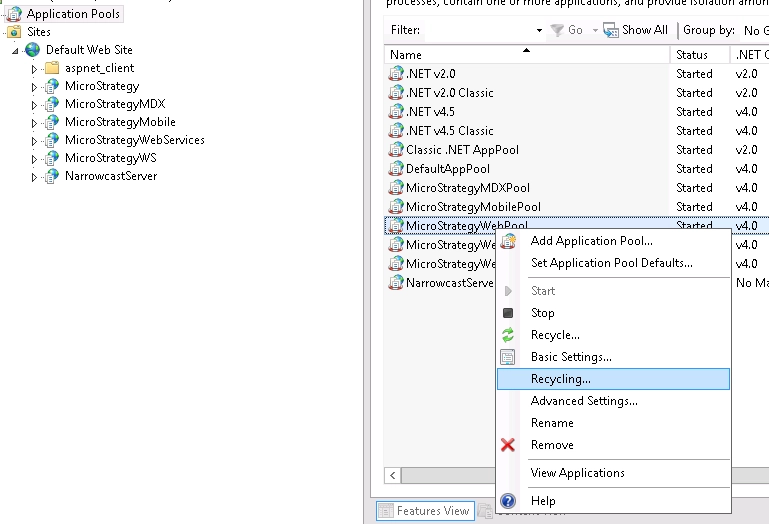
1. Open IIS manager, expand the Application Pools folder->right click on StrategyWebPool->Recycling
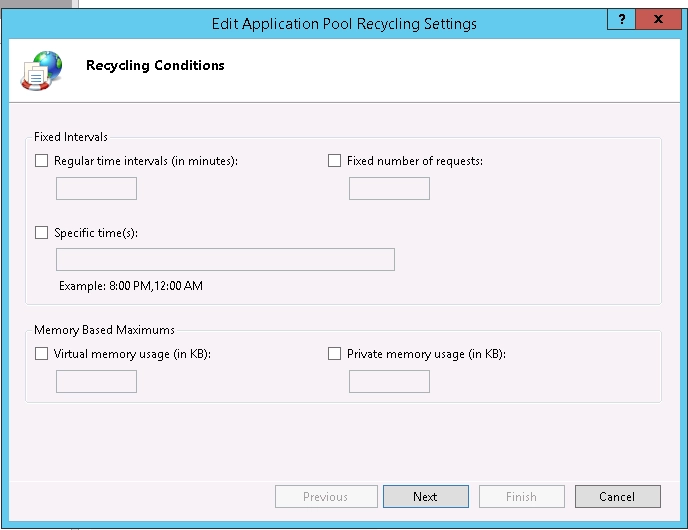
2. In Recycling tab, make sure all the items are unchecked, or large enough to support the idle time out value:
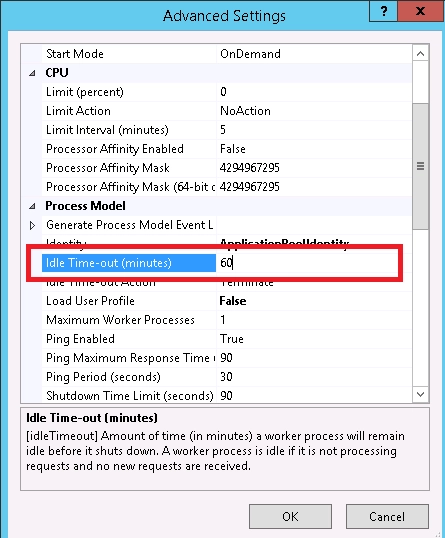
3. Right click on StrategyWebPool->"Advanced Settings", in "Process Model"--"Idle Time-out(minutes)" field, input the expected duration, for example 60 minutes as in the screenshot.
4. Restart IIS. After restarting the Strategy Web user should be able to keep the session idle for the expected duration.
