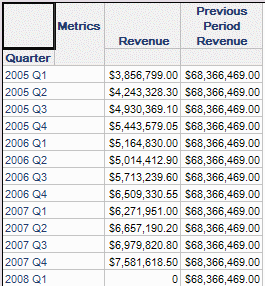
By default, if a custom MDX metric is used in a Strategy report where some attributes have been removed from the template and placed in the Report Objects window, that metric will return aggregation nulls for the result.
For example, this metric has been defined as part of a Microsoft Analysis Services cube to return revenue from the previous period.
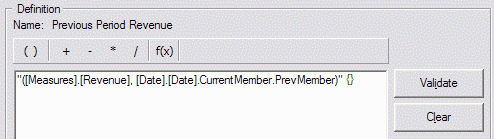
"(., ..CurrentMember.PrevMember)" {}
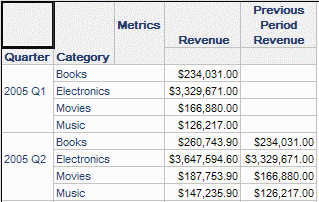
Partial result with all attributes on the template
Dynamic aggregation after moving Category to the Report Objects window
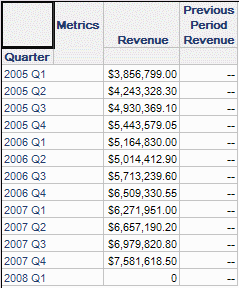
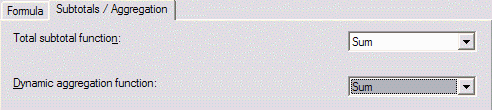
The dynamic aggregation nulls occur because the metric's dynamic aggregation function is set to Default. The user can override the default manually by changing the dynamic aggregation function in the metric editor. After this change, however, dynamic aggregation in Strategy 9.0.x rolls the metric up to the grand total level, with one value for all rows.
This behavior occurs because custom MDX formulas are normally defined with an empty dimensionality. This is shown in the metric editor by the empty pair of curly braces following the MDX string.
"(., ..CurrentMember.PrevMember)" {}
The Analytical Engine performs the dynamic aggregation in accordance with the empty dimensionality. This is like a SELECT statement in SQL calculating a Sum or other aggregation without a GROUP BY clause. By definition this will return exactly one value aggregating all the source values together.
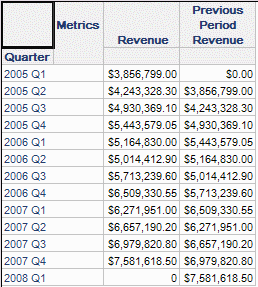
In Strategy 9.0.x, it is possible to define a custom MDX metric with report level dimensionality, by adding a tilde (~) between the curly braces. This allows the Analytical Engine to aggregate over the attributes that have been moved into the Report Objects window.
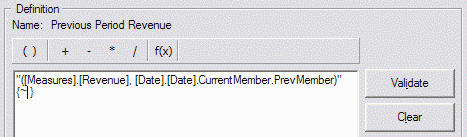
"(., ..CurrentMember.PrevMember)" {~}
Result of dynamic aggregation with report-level dimensionality
Notes
Dimensionality and ApplySimple metrics in MDX cubes
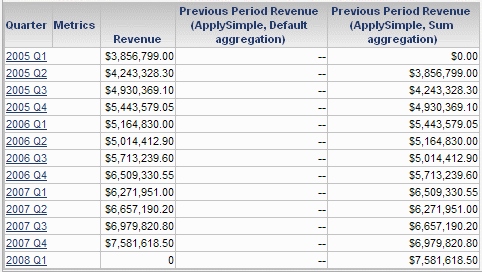
ApplySimple is not an aggregate function in Strategy; therefore it cannot have any dimensionality associated with it. However, custom MDX metrics using ApplySimple are automatically assumed to be at report level, so there is no need to apply report level dimensionality explicitly.
Just like metrics defined by a custom MDX string, ApplySimple metrics return dynamic aggregation nulls by default. The user needs to set the dynamic aggregation function to Sum or another appropriate function, but this should be sufficient.
Further reading
Consult the following Strategy KnowledgeBase document for more information on using custom MDX expressions in Strategy metrics.
KB16057: How to create customized metric expressions for MDX Cube data sources in MicroStrategy Engine
