EducationSoftwareStrategy.com
StrategyCommunity

Knowledge Base

Product

Community

Knowledge Base

TopicsBrowse ArticlesDeveloper Zone

Product

Download SoftwareProduct DocumentationSecurity Hub

Education

Tutorial VideosSolution GalleryEducation courses

Community

GuidelinesGrandmastersEvents
x_social-icon_white.svglinkedin_social-icon_white.svg
Strategy logoCommunity

© Strategy Inc. All Rights Reserved.

LegalTerms of UsePrivacy Policy
  1. Home
  2. Topics

KB31820: How to import an Object Manager package in MicroStrategy 9.4.x-10.x?


Community Admin

• Strategy


This knowledge base article explains the process of importing an Object Manager package in MicroStrategy 9.4.x-10.x

To import an update package from Object Manager:
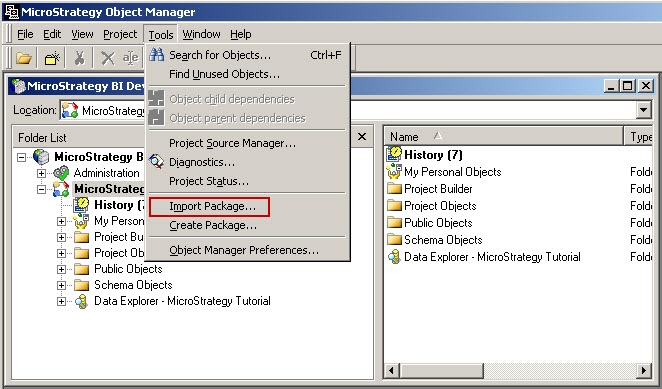
  • In Object Manager, log in to the destination project source and project.
  • From the Tools menu, select Import Package:
ka04W000000rZQAQA2_0EM440000002EIE.jpeg
  • Browse to the saved update package and select it. The default file extension for update packages is .mmp:
  • Click OK. All objects in the update package are copied to the destination project or project source, following the rules specified in the update package.
  • If the package made any changes to the project schema, users may need to update the schema for the changes to take effect. To update the project schema, from the Object Manager Project menu, select Update Schema.

To verify that the import was successful, and to locate newly added objects, check the DSSerrors.log for information pertaining to the import.
Please see the following technical note for further information on obtaining import information from the DSSErrors.log file:
KB31819 - Where is the log file that contains information on creating and importing Strategy Object Manager packages in 9.x?


Comment

0 comments

Details

Knowledge Article

Published:

May 11, 2017

Last Updated:

June 21, 2019