Starting with Strategy Secure Enterprise 10.4, within a cluster, Work Fences allow an administrator to reserve specific nodes for use by certain users or certain workloads during normal operations.
This new feature is available in Strategy 10.4 GA and 10.4 Hotfix 1.
The feature has been surpressed since Strategy 10.4 Hotfix 2. It is redesigned and available in Strategy 10.9.
Refer to Technical Document below for more details:
New setting in MicroStrategy Secure Enterprise 10.9: Enable Fencing
There are two types of fences:
Examples:
A user fence could be configured for users who require more processing power or high availability. Conversely, a workload fence, could be configured to limit the resources for lower priority subscriptions.
Typically, the majority of the nodes in a cluster will not be part of a fence, making them available for general use. All configured fences are defined in a single list ordered by precedence. When a request is received, the ordered list of all fences and their configurations are assessed to determine if the request matches any fence configuration. A request will be processed by the first fence found with an available node in the ordered list where the request matches the fence criteria.
When all nodes in the cluster are part of the fence list, the request will be sent to a node in the last fence in the ordered list.
Fencing is not supported with legacy clients which includes Strategy Developer and administration tools such as Command Manager.
Consider the following figure which shows a clustered implementation with eight nodes:
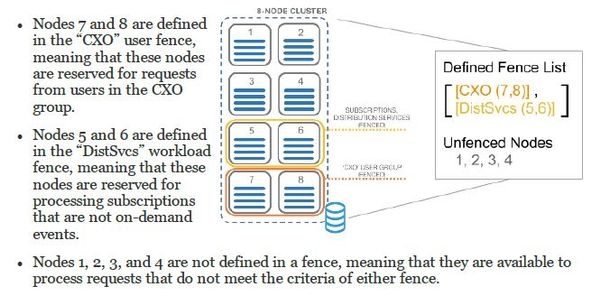
Using fences with asymmetric project clustering
When user fences are configured with a cluster that has projects that are only loaded on specific nodes, users are always sent to a node that supports the project. The first fence found in the priority list that includes a node where the requested project is loaded will be used.
NOTE:
Refer to Product Manual "System Administration Guide" >”Clustering Intelligence Servers”>”Reserving nodes with work fences” for more details.
Refer to Technical Document below for how to configure work fences:
KB318755 -- How to configure work fences in Strategy 10.x Secure Enterprise Platform
318757
