Normalization in Strategy Analytical Engine
The Strategy Analytical Engine is responsible for a variety of calculations that take place outside of database queries, including functions that are not supported by the database platform, subtotals, consolidations and Strategy OLAP Services features such as dynamic aggregation, derived metrics and view filtering.
Aggregation performed in the Analytical Engine needs to be aware of the calculation levels of the input metrics to avoid multiple counting in subtotals or dynamic aggregation. For example, if a report includes a metric whose dimensionality specifies Year level and Quarter is also on the template, the year-level values will be repeated over quarters. A subtotal should count a year's value only once for that year, not once for each quarter (which would multiply the current subtotal by four).
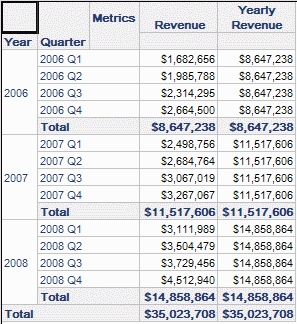
To achieve this result, the Strategy Analytical Engine normalizes the elements for each attribute in the report, and associates metric values with distinct elements of their key attributes. In this report, the report level revenue metric calculates at the level of quarter and has 12 distinct values. Yearly revenue has three distinct values, one for each year, and would be represented internally as follows:
Linux / UNIX: MSTREMService Case([Metric Selector]="Rebates", Discount, [Metric Selector]="Sales", Revenue, 0) Add the "Generic Metric" attribute in the filter panelYou can now select one Metric or the other, or both to dynamically change the content of your dashboard.Operating SystemSmallMediumBigLargeWindow 32-bit <= 16KB< 512KB>= 512KBSolaris <= 65376< 32MB>= 32MBLinux <= 65376< 32MB>= 32MBAIX <= 65376< ULONG_MAX (defined in limits.h)NoneHP-UX <= 65376< ULONG_MAX (defined in limits.h)None2006$8,647,2382007$11,517,6062008$14,858,864 | Linux / UNIX: MSTREMService Case([Metric Selector]="Rebates", Discount, [Metric Selector]="Sales", Revenue, 0) Add the "Generic Metric" attribute in the filter panelYou can now select one Metric or the other, or both to dynamically change the content of your dashboard.Operating SystemSmallMediumBigLargeWindow 32-bit <= 16KB< 512KB>= 512KBSolaris <= 65376< 32MB>= 32MBLinux <= 65376< 32MB>= 32MBAIX <= 65376< ULONG_MAX (defined in limits.h)NoneHP-UX <= 65376< ULONG_MAX (defined in limits.h)None2006$8,647,2382007$11,517,6062008$14,858,864 |
Linux / UNIX: MSTREMService Case([Metric Selector]="Rebates", Discount, [Metric Selector]="Sales", Revenue, 0) Add the "Generic Metric" attribute in the filter panelYou can now select one Metric or the other, or both to dynamically change the content of your dashboard.Operating SystemSmallMediumBigLargeWindow 32-bit <= 16KB< 512KB>= 512KBSolaris <= 65376< 32MB>= 32MBLinux <= 65376< 32MB>= 32MBAIX <= 65376< ULONG_MAX (defined in limits.h)NoneHP-UX <= 65376< ULONG_MAX (defined in limits.h)None2006$8,647,2382007$11,517,6062008$14,858,864 | Linux / UNIX: MSTREMService Case([Metric Selector]="Rebates", Discount, [Metric Selector]="Sales", Revenue, 0) Add the "Generic Metric" attribute in the filter panelYou can now select one Metric or the other, or both to dynamically change the content of your dashboard.Operating SystemSmallMediumBigLargeWindow 32-bit <= 16KB< 512KB>= 512KBSolaris <= 65376< 32MB>= 32MBLinux <= 65376< 32MB>= 32MBAIX <= 65376< ULONG_MAX (defined in limits.h)NoneHP-UX <= 65376< ULONG_MAX (defined in limits.h)None2006$8,647,2382007$11,517,6062008$14,858,864 |
Linux / UNIX: MSTREMService Case([Metric Selector]="Rebates", Discount, [Metric Selector]="Sales", Revenue, 0) Add the "Generic Metric" attribute in the filter panelYou can now select one Metric or the other, or both to dynamically change the content of your dashboard.Operating SystemSmallMediumBigLargeWindow 32-bit <= 16KB< 512KB>= 512KBSolaris <= 65376< 32MB>= 32MBLinux <= 65376< 32MB>= 32MBAIX <= 65376< ULONG_MAX (defined in limits.h)NoneHP-UX <= 65376< ULONG_MAX (defined in limits.h)None2006$8,647,2382007$11,517,6062008$14,858,864 | Linux / UNIX: MSTREMService Case([Metric Selector]="Rebates", Discount, [Metric Selector]="Sales", Revenue, 0) Add the "Generic Metric" attribute in the filter panelYou can now select one Metric or the other, or both to dynamically change the content of your dashboard.Operating SystemSmallMediumBigLargeWindow 32-bit <= 16KB< 512KB>= 512KBSolaris <= 65376< 32MB>= 32MBLinux <= 65376< 32MB>= 32MBAIX <= 65376< ULONG_MAX (defined in limits.h)NoneHP-UX <= 65376< ULONG_MAX (defined in limits.h)None2006$8,647,2382007$11,517,6062008$14,858,864 |
When calculating the grand total over yearly revenue, the Analytical Engine simply sums the three distinct values and produces the right total, without the inflation that would occur if the sum were taken over the 12 rows displayed in the report.
Normalization is critical to obtain correct results, particularly for dimensional metrics, in any aggregation performed by the Analytical Engine. This includes "Personalized Intelligent Cube" reports (which have the same structure as OLAP Services reports in Strategy 8.1.x) and view reports based on Strategy 9.x Intelligent Cubes.
What are the VLDB properties "Data Population for Intelligent Cubes" and "Data Population for Reports"?
These VLDB properties control the method by which the report data are normalized.
Both properties are located in the Query Optimizations folder in the VLDB property editor. In an Intelligent Cube report, only the "Data Population for Intelligent Cubes" will be visible; in standard reports, it will be "Data Population for Reports."
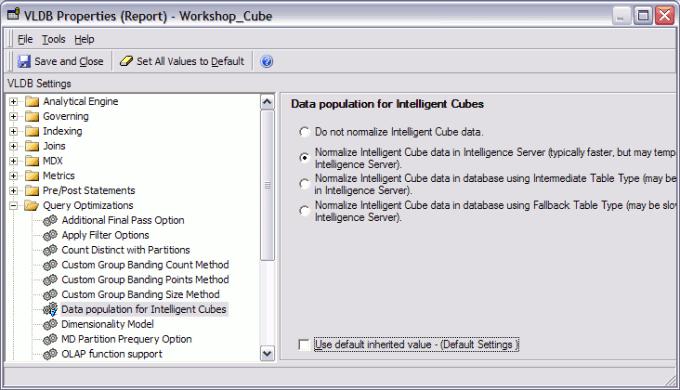
Both properties are visible in the VLDB Properties for a database instance. Thus, it is possible to specify different behavior for Intelligent Cubes and normal reports as default settings in the project's warehouse.
Normalization options in Strategy 9.0.0
Strategy Engine 9.0.0 provides four normalization options:
These options refer to normalization that can be performed before passing data to the Analytical Engine. If "Do not normalize" is selected, it means that no normalization will be done while retrieving data from the database. The Analytical Engine still requires normalized data. With this setting, the data retrieved directly into the Intelligence Server are not normalized, and the Analytical Engine will normalize the dataset once the entire table is loaded.
The other options reduce the amount of raw data that must be brought into the Intelligence Server, and shift the burden of normalization away from the Analytical Engine and into the Query Engine.
In the SQL examples that follow, two metrics have already been selected into separate passes (#ZZMD00 and #ZZMD01). Those passes are not shown because normalization affects only the final result pass.
Do not normalize Intelligent Cube/Report data.
This is the default option, and preserves the data population method from Strategy 8.1.x. SQL is generated to produce a single final result table*, which is retrieved all at once into Intelligence Server memory. The Analytical Engine constructs its normalized data sets based on this single flat table.
* Consolidations and custom groups generate multiple result tables.
This option is the most expensive in terms of memory because description forms for parent-level attributes will be repeated across several rows.
Result retrieval pass:
select pa11.REGION_ID REGION_ID,
a14.REGION_NAME REGION_NAME0,
pa11.CATEGORY_ID CATEGORY_ID,
a13.CATEGORY_DESC CATEGORY_DESC0,
pa11.Revenue Revenue,
pa12.WJXBFS1 WJXBFS1
from #ZZMD00 pa11
join #ZZMD01 pa12
on (pa11.CATEGORY_ID = pa12.CATEGORY_ID and
pa11.REGION_ID = pa12.REGION_ID)
join LU_CATEGORY a13
on (pa11.CATEGORY_ID = a13.CATEGORY_ID)
join LU_REGION a14
on (pa11.REGION_ID = a14.REGION_ID)
Normalize Intelligent Cube/Report data in Intelligence Server (typically faster, but may temporarily use more memory in Intelligence Server).
Like "Do not normalize...," SQL generation produces one final result table in which description forms are repeated. Instead of passing the raw result directly to the Intelligence Server, however, the Query Engine analyzes the attribute columns for distinct elements and, for description forms, sends only one copy of each. Metric data are transferred with attribute ID forms only.
When the Intelligence Server executes reports, the Query Engine divides the result into segments of roughly 100MB apiece. Each segment is normalized in the Query Engine separately. If the same attribute element appears in multiple segments, it will be sent to the Intelligence Server once for each segment. Thus, Intelligence Server memory usage is not absolutely minimal but it is an improvement over the raw result sent without normalization. Performance of large queries may be improved because less raw data must be transferred from the database connection process into the Intelligence Server. However, the memory usage of the database connection process may increase.
Result retrieval pass (same as "Do not normalize..."; Query Engine behavior is different):
select pa11.REGION_ID REGION_ID,
a14.REGION_NAME REGION_NAME0,
pa11.CATEGORY_ID CATEGORY_ID,
a13.CATEGORY_DESC CATEGORY_DESC0,
pa11.Revenue Revenue,
pa12.WJXBFS1 WJXBFS1
from #ZZMD00 pa11
join #ZZMD01 pa12
on (pa11.CATEGORY_ID = pa12.CATEGORY_ID and
pa11.REGION_ID = pa12.REGION_ID)
join LU_CATEGORY a13
on (pa11.CATEGORY_ID = a13.CATEGORY_ID)
join LU_REGION a14
on (pa11.REGION_ID = a14.REGION_ID)
Normalize Intelligent Cube/Report data in database using Intermediate Table Type (may be slower, but uses less memory in Intelligence Server).
This option normalizes the data in the database before fetching the results. A temporary table is created (using the table type specified by the Intermediate Table Type VLDB property) containing the final result table as it would have been generated normally, including all attribute ID and description forms. Then, multiple SELECT statements are issued against this table. Every attribute with description forms is retrieved separately using SELECT DISTINCT. Metric values are retrieved by selecting attribute ID forms and metric columns in a separate SELECT.
This option is the most efficient for memory use because duplicated description forms never enter into any Strategy process. The data are reduced to the bare minimum before any fetching takes place. However, creating the temporary table for the final result uses database resources, and the multiple SELECT statements issued against it may take more time than the single SELECT used by the first two options. For very large data sets, the memory improvement may be worth a slightly longer response time.
Attributes where only the ID form is used in the report (no description forms) will not be selected in a separate pass, because the ID columns already exist in the final result intermediate table.
Result retrieval passes:
select pa11.REGION_ID REGION_ID,
a14.REGION_NAME REGION_NAME0,
pa11.CATEGORY_ID CATEGORY_ID,
a13.CATEGORY_DESC CATEGORY_DESC0,
pa11.Revenue Revenue,
pa12.WJXBFS1 WJXBFS1
-- Final result table is inserted into a temporary table
into #ZZMD02
from #ZZMD00 pa11
join #ZZMD01 pa12
on (pa11.CATEGORY_ID = pa12.CATEGORY_ID and
pa11.REGION_ID = pa12.REGION_ID)
join LU_CATEGORY a13
on (pa11.CATEGORY_ID = a13.CATEGORY_ID)
join LU_REGION a14
on (pa11.REGION_ID = a14.REGION_ID)
-- Distinct sets of elements are retrieved for each attribute with description forms
select distinct pa11.REGION_ID REGION_ID,
pa11.REGION_NAME0 REGION_NAME0
from #ZZMD02 pa11
select distinct pa11.CATEGORY_ID CATEGORY_ID,
pa11.CATEGORY_DESC0 CATEGORY_DESC0
from #ZZMD02 pa11
-- IDs and metric values are selected
select pa11.CATEGORY_ID CATEGORY_ID,
pa11.REGION_ID REGION_ID,
pa11.Revenue WJXBFS1,
pa11.WJXBFS1 WJXBFS2
from #ZZMD02 pa11
Normalize Intelligent Cube/Report data in database using Fallback Table Type (may be slower, but uses less memory in Intelligence Server).
This option follows the same procedure as the previous option, except that the intermediate table is created according to the Fallback Table Type VLDB property. This is appropriate for environments where the Intermediate Table Type is set to Common table expression or Derived table, which cannot be used for database-side normalization.
Which option should be used?
The various settings are designed for different circumstances. Project administrators should evaluate large reports to decide which optimization -- space or speed -- is more important for the specific report.
"Normalize Intelligent Cube/Report data in Intelligence Server" may improve performance, at the cost of additional memory use in the database connection process. (In Strategy Intelligence Server Universal environments in UNIX/Linux, this may require the memory contract manager setting "Memory reserved for other processes" to be increased. Microsoft Windows memory management behaves differently and may not be affected.)
"Normalize Intelligent Cube/Report data in database" will reduce resource utilization in Strategy Intelligence Server, but will also increase load on the database. If this option is chosen at database instance level to apply to all reports in a project, administrators should conduct tests to be sure that the database will handle the additional processing without issue.
The normalization options are unlikely to reduce memory consumption significantly for small reports.
Normalization options in Strategy Engine 9.0.1
Some of the options have changed in Strategy Engine 9.0.1.
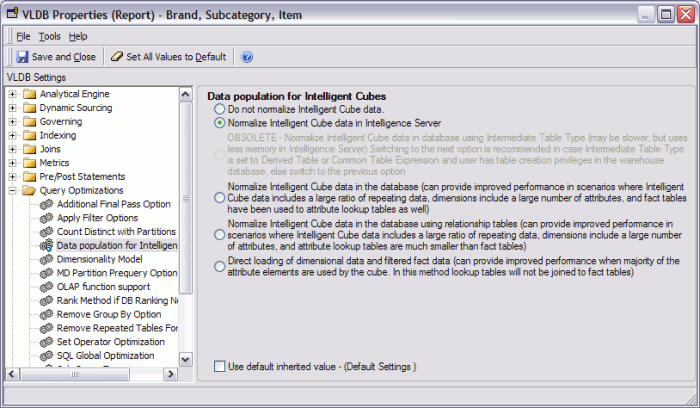
The 9.0.0 option, "Normalize Intelligent Cube data in database using Intermediate Table Type," has been deprecated in favor of the following. The behavior of the new option corresponds to the older option, except that the Fallback Table Type will be used automatically for the normalization tables if the Intermediate Table Type is either "Derived table" or "Common table expression." Functionality has not been lost by marking the original option as obsolete.
Two new options have been added:
Normalize Intelligent Cube data in the database (can provide improved performance in scenarios where... attribute lookup tables are much smaller than fact tables)
This option streamlines the intermediate table for the final result by inserting only the key attribute IDs and metric values. Subsequently, for each dimension (grouping of related attributes), an intermediate table is created selecting key data from the final result table and joining to lookup tables to obtain IDs for parent attributes and all required description forms.
This will reduce the size of the metric result intermediate table by omitting attribute descriptions. Additional intermediate tables will be created, however.
Result retrieval passes:
-- Intermediate table for metric results, with attribute IDs only
select pa11.CATEGORY_ID CATEGORY_ID,
pa11.REGION_ID REGION_ID,
pa11.Revenue Revenue,
pa12.WJXBFS1 WJXBFS1
into #ZZMD02
from #ZZMD00 pa11
join #ZZMD01 pa12
on (pa11.CATEGORY_ID = pa12.CATEGORY_ID and
pa11.REGION_ID = pa12.REGION_ID)
-- Select distinct sets of attribute IDs (only those found in the joined metric result table)
select distinct pa11.CATEGORY_ID CATEGORY_ID
into #ZZMD03
from #ZZMD02 pa11
select distinct pa11.REGION_ID REGION_ID
into #ZZMD04
from #ZZMD02 pa11
-- Select description forms directly from the lookup tables, using the distinct IDs as filters
select pa11.CATEGORY_ID CATEGORY_ID,
a12.CATEGORY_DESC CATEGORY_DESC0
from #ZZMD03 pa11
join LU_CATEGORY a12
on (pa11.CATEGORY_ID = a12.CATEGORY_ID)
select pa11.REGION_ID REGION_ID,
a12.REGION_NAME REGION_NAME0
from #ZZMD04 pa11
join LU_REGION a12
on (pa11.REGION_ID = a12.REGION_ID)
-- Select metric results and attribute IDs into Intelligence Server
select pa11.CATEGORY_ID CATEGORY_ID,
pa11.REGION_ID REGION_ID,
pa11.Revenue WJXBFS1,
pa11.WJXBFS1 WJXBFS2
from #ZZMD02 pa11
Direct loading of dimensional data and filtered fact data (can provide improved performance when majority of the attribute elements are used by the cube. In this method lookup tables will not be joined to fact tables)
This option is provided only for Intelligent Cubes; it is not available for normal reports. Instead of creating intermediate tables for dimensions, all attribute elements are selected directly from the lookup tables, whether or not they are present in the metric results. No intermediate table is created for the joined metric results. The final pass simply joins them and selects attribute IDs, without joining to lookup tables.
Some attribute data will be retrieved into the Intelligence Server that are not strictly necessary for Intelligent Cube reporting, but database load will be reduced compared to the other "Normalize... in database" options. This will not affect metric results; however, attribute elements may be visible in element lists for filters or prompts that do not have corresponding metric data.
-- SELECT attribute IDs and descriptions from lookup tables, without filtering
select a11.CATEGORY_ID CATEGORY_ID,
a11.CATEGORY_DESC CATEGORY_DESC0
from LU_CATEGORY a11
select a11.REGION_ID REGION_ID,
a11.REGION_NAME REGION_NAME0
from LU_REGION a11
-- Join metric results along with attribute IDs only
select pa11.CATEGORY_ID CATEGORY_ID,
pa11.REGION_ID REGION_ID,
pa11.Revenue Revenue,
pa12.WJXBFS1 WJXBFS1
from #ZZMD00 pa11
join #ZZMD01 pa12
on (pa11.CATEGORY_ID = pa12.CATEGORY_ID and
pa11.REGION_ID = pa12.REGION_ID)
Users should be aware of a potential issue when normalizing Intelligent Cube data without attribute filtering when the data warehouse uses a case insensitive collation. Consult the following Strategy Knowledgebase document for details.
KB32013 : Data discrepancy in an Intelligent Cube when normalizing lookup data without filtering in a case insensitive data warehouse in Strategy OLAP Services 9.0.1 and later
