EducationSoftwareStrategy.com
StrategyCommunity

Knowledge Base

Product

Community

Knowledge Base

TopicsBrowse ArticlesDeveloper Zone

Product

Download SoftwareProduct DocumentationSecurity Hub

Education

Tutorial VideosSolution GalleryEducation courses

Community

GuidelinesGrandmastersEvents
x_social-icon_white.svglinkedin_social-icon_white.svg
Strategy logoCommunity

© Strategy Inc. All Rights Reserved.

LegalTerms of UsePrivacy Policy
  1. Home
  2. Topics

KB324153: New Feature: Define the My Page layout for multiple users in MicroStrategy Web 10.4.x


Community Admin

• Strategy


Starting in MicroStrategy Web 10.1, as seen in tech note KB258959, users can set My Page as the default start page. In MicroStrategy Web 10.4.x, administrators can customize the page to display Shared Reports of your selection, recently used dashboards, or add/remove images, folders, and HTML containers and share this layout so users can load the default layout.

Starting in Strategy Web 10.1, as seen in tech note KB258959, users can set My Page as the default start page.
 
In Strategy Web 10.4.x, administrators can customize the page to display Shared Reports of your selection, recently used dashboards, or add/remove images, folders, and HTML containers and share this layout so users can load the default layout.
 
You must be an Administrator to make these changes to the template layout.
 
To use this feature, follow the next steps, after following the steps from tech note KB258959 to have the My Page set as the default page:
  1. Log into a project.
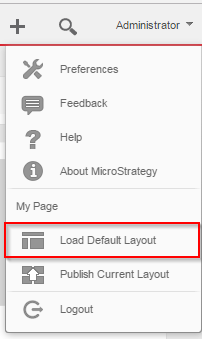
  2. On the upper right of any page, click your user name, then select Load Default Layout from the drop-down list. The Default page opens.


ka04W000000OcOjQAK_0EM4400000025Lz.jpeg
  1. Make the desired changes in the template.
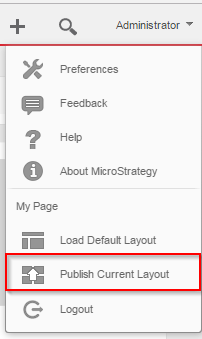
  2. To make the template available to users, you need to publish the template. From the drop-down list under your username, click Publish Current Layout. The template you saved is published to My Page for Strategy users.


ka04W000000OcOjQAK_0EM4400000025Lx.jpeg


  1. Once the users are logged in, to use the default layout defined by the Administrator, thy can use the “Load Default Layout” option.

Comment

0 comments

Details

Knowledge Article

Published:

June 7, 2017

Last Updated:

June 7, 2017