SYMPTOM
When a user executes a report against a SAP BI data source, the following error occurs with specific filtering conditions. Those conditions may be hardcoded into the report, or dependent on the user's prompt answers.
Sample Code/Error
Status: Execution failed
Error: SQL Generation Complete
QueryEngine encountered error: Unspecified exception caught in Query Engine.
Error in Process method of Component: QueryEngineServer, Project SAP BW, Job 1048, Error Code= -2147212544.
With different values in the filter, the error does not occur, and the error occurs consistently for the same filtering conditions.
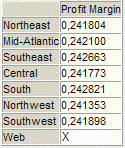
If the user copies the MDX query text out of the Strategy report's SQL/MDX view, and then executes the query using the MDX Test Editor in SAP Front End, some of the returned metric cells contain text data, such as "X."
Consult the following Strategy Knowledgebase document for more information on running MDX queries in SAP Front End.
KB16082: How to verify SAP BW query results using the MDX Test Editor tool in the SAP Front End application
CAUSE
SAP BI cubes can be defined with complex calculations in the Measures dimension. These are imported into Strategy as metrics, and are analogous to non-smart compound metrics in Strategy (where the compound calculation takes place in the database).
In case the calculation fails (no data, unexpected value, numeric overflow etc.), SAP BI includes an option to display a string in the Business Explorer Analyzer interface. Typically these cells remain blank, but a SAP administrator may wish to return a text code to describe the error to the user. These strings are set in the SAP Front End interface, under transaction code RSCUSTV4. In this example, any calculation with a numeric overflow or division by zero, or where one or more operands is null will display in Business Explorer Analyzer as "X."
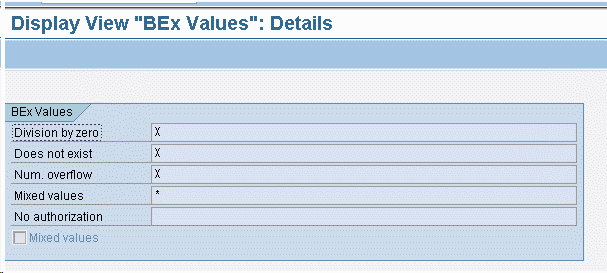
When these error cell values are returned to Strategy, the metric column must hold two different data types: numeric for the successful calculations, and character for the error values. In current releases, Strategy expects a single data type for the column. This causes the Query Engine to throw an exception when trying to add a non-numeric value to a column which should be numeric (since it holds metric values).
ACTION
This case is logged with Strategy Technology for review. Contact Strategy Technical Support for an update on the status of this issue.
WORKAROUND
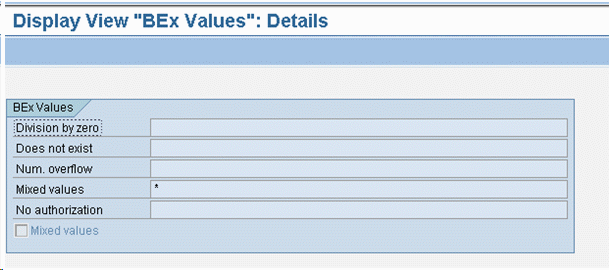
The Query Engine error may be avoided by replacing the Display View "BEx Values" with empty strings. Those are returned to Strategy as nulls, which are permitted in metric columns.
KB32539
