Intelligent Cubes are multidimensional cubes (sets of data) that exist in the Strategy Intelligence Server memory and can be shared among different users. The fact that the Intelligent Cube resides on the Strategy Intelligence Server memory reduces response time for reports using them.
The cube population process is the process of translating the data retrieved from the database into a format which can readily be consumed by different report requests. The cube population process can be expensive in time and memory if the cube is large. It depends on the cube structure, Intelligence Server and Database Server power along with the network bandwidth how much time it will take for the cube to publish, and it depends on the cube structure and amount of data retrieved from the Warehouse, how much memory it will be used for the process.
Because there are different environments and different data model designs and reporting needs, there are different cube population methods that can place the bulk of the workload on the optimal environment component (Database Server or Intelligence Server) or that use different processing algorithms that are better for different cube structures. This is in order to either improve performance, reduce memory usage or both.
It is important to select the best population method according to the environment and structure of each cube.
Next is the explanation of the different kinds of cube population methods, there are five of them:
1. Do not normalize Intelligent Cube data.
2. Normalize Intelligent Cube data in Strategy Intelligence Server .
3. Normalize Intelligent Cube data in the Database
4. Normalize Intelligent Cube data in the Database using relationship tables.
5. Direct loading of dimensional data and filtered fact data.
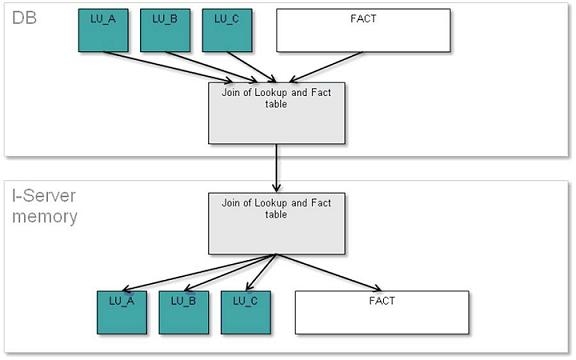
Do not normalize Intelligent Cube data:
This method used to be in place before current versions of Strategy, and it is not recommended to be used unless the other methods fail to publish the Intelligent cube.
In general, this method works the following way: It will join the lookup tables (including its description form columns) with the fact table and filter it with the report filter, and then it will transfer this table to the Strategy Intelligence Server. The Strategy Intelligence Server will keep one copy of this table on memory, and then normalize it into a table with fact columns and the attribute ID columns and into different attribute lookup tables within the memory. After the normalization takes place, the original table is dropped from the Strategy Intelligence Server memory.
There are several disadvantages:
Because of these disadvantages, other methods are preferred over this one and it should not be used unless the other methods fail.
Normalize Intelligent Cube data in Strategy Intelligence Server
This method is similar to the previous “Do not normalize Intelligent Cube Data” with the exception that the data is normalized within Strategy Intelligence Server as it arrives. This has the advantage of not storing the non-normalized table within the Strategy Intelligence Server memory.
The process for this method is the following:
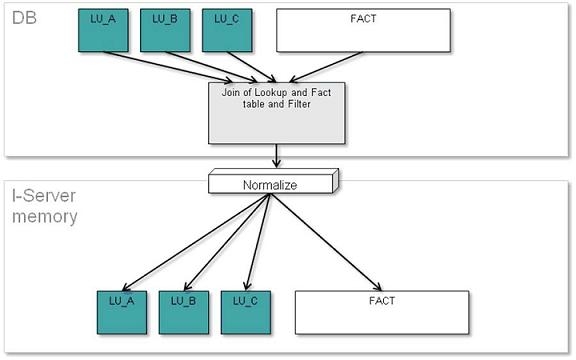
Join the lookup tables (including its description forms columns) with the fact table and filter it with the report filter, and then it will transfer this not normalized table to Strategy Intelligence Server . Then on the Strategy Intelligence Server side, it will normalize the table being transferred as it comes into the Fact table with the attribute key columns and into the different attribute lookup table.
The advantage of this method is that there is no need to store the normalized table on Strategy Intelligence Server memory anymore, reducing the memory spent in the process. The internal testing shows that this method is in general better than any other method, and that is why this method is the default one.
The disadvantage in this method is that the non-normalized table is transferred over the network, which could be noticeable slower in slow network environments or where there is significant amounts of redundant data present in the non-normalized table.
This is the recommended method to use, except when faced with specific report designs which normally behave better with later Intelligent cube population methods.
The diagram of the process of the method “Normalize Intelligent Cube data in Intelligence Server” is below:
Normalize Intelligent Cube data in the Database
This method will do the same first steps as the previous methods, that is, joining the tables in the Database Server side, but after that, it will send commands to the Database Server to normalize the table within the Database Server.
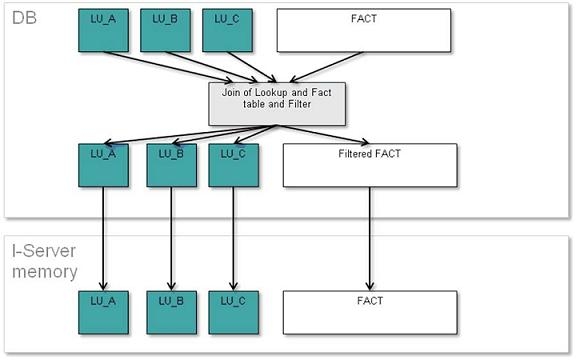
In general, the process is: Join the lookup tables (including its description forms columns) with the fact table and filter it with the report filter, and then normalize this last table into a fact table with fact columns plus all the attribute ID columns, and into different lookup table, one for each attribute.
The advantage that the method has against the previous methods is that the normalization logic is done on the Database Server instead of the Strategy Intelligence Server side. This could be an advantage or not depending on the power of Strategy Intelligence Server and Database Server machine.
Another advantage is the fact that the redundant data is not transferred across the network.
This method is recommended when the cube has:
The diagram that shows this methods process is below:
Normalize Intelligent Cube data in the Database using relationship tables
This method is very similar to the method “Normalize Intelligent Cube data in the Database” with a small difference.
In this method the fact table is normalized even more by removing attribute ID columns from it which are from attributes which are not the lowest level attribute of their dimension within the cube. And the product will generate an extra table per each dimension containing the dimension attribute relationship.
This generates advantages of removing the repetition even further (because the final fact table transferred to Strategy Intelligence Server will only contain the fact columns plus the lowest level attribute ID column of each dimension instead of all the higher level attribute ID column as in the “Normalize Intelligent Cube data in the Database” method) and with that, smaller network footprint.
However, this extra normalization takes a toll on the DB Server because of the Joins needed between the attribute lookup tables that takes generate each dimension relationship table.
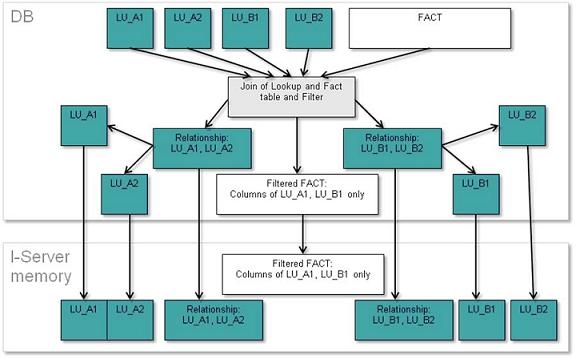
The process of this method is the following: Join the lookup tables (including its description forms columns) with the fact table and filter it with the report filter. Then for each different dimension, obtain the lowest level attribute that exist on the not normalized table and then join with all the higher level attribute lookup tables in that dimension that exist on the cube. After this process is done for each dimension, obtain one unique table for all the attributes and one fact table that contain the fact columns plus the lowest level attribute ID columns. Then the fact table, relationship tables and the lookup tables are transferred to the Strategy Intelligence Server .
This method is recommended in the following situations:
The diagram of this methods process is (when A1 and A2 are in one dimension and B1, B2 are in other dimension and B1 and A1 are the lower level attributes):
When to use “Normalize Intelligent Cube data in the Database using relationship tables” and when to use “Normalize Intelligent Cube data in the Database”
The decision is based on the size of the lookup tables. If the lookup tables to be used in the cube are of the same approximate size (number of rows) as the fact table then it is not ideal to use “relationship tables” as those require lookup table joins which are more expensive if the lookup tables contain many rows. On the other hand, when the lookup tables are really small then it is better to use “relationship tables”.
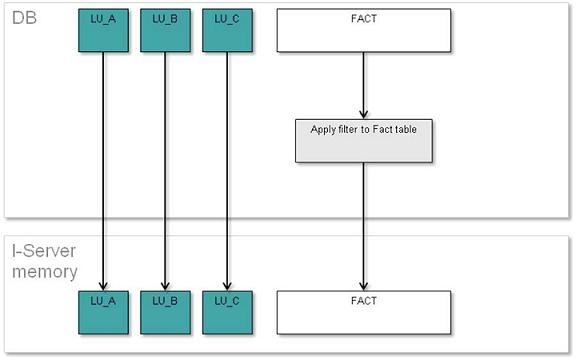
Direct loading of dimensional data and filtered fact data.
This method does not join the fact table with the lookup tables to begin with, then this method will retrieve all the lookup tables into Strategy Intelligence Server without being filtered by the fact table or by the report filter.
This method is useful when the user knows that the Intelligent cube report will not have filters, and if it has it, that the filter will not exclude all the attribute elements. Because if most of the attribute elements from the cube are used, then there will be a lookup table which contains all the attribute elements while avoiding additional processing needed to get that dat.
The process for this method is: Filter the fact table, then transfer the lookup tables of the attributes in the cube to the Strategy Intelligence Server, together with the filtered fact table.
The advantage of the method is that it will avoid the joins done between the fact and the lookup table.
This method should be used when the Intelligent cube contains most of the attribute elements (for example, there are no filters in the report).
The diagram that shows this method process is below:
When to use each population method summary table:
Method: | Normalization on I-Server | Normalization on Database | Normalization on Database using relationship tables | Direct loading |
When to use it? | It is the best case in most situations except in the cases specified in the other three methods. | When the cube contains: -Many attribute repetitions. -A lot of dimensions -Fact table act as lookup table. | When the cube contains: -Many attribute repetitions. -A lot of dimensions -Small attribute lookup tables. | When the cube contains no filter. Or when the cube uses most of the attribute elements. |
When not to use it? | When the specific cases specified in the other methods are meet. | When cube does not comply with above conditions. | When cube uses lookup tables with many number of rows. | Cube does not uses all the attribute elements. |
For more information refer to Knowledge Base document: KB32010-What are the Data Population VLDB properties in Strategy Engine?
How to access the Cube Population method settings?
1. In Strategy Developer, edit the Intelligent Cube.
2. Then in the cube editor, go to the menu: Data > VLDB Properties to open the VLDB Properties window.
3. In the VLDB Properties dialog go to the menu: Tools > Show Advanced Settings.
4. Then go to the key “Query Optimization” > “Data Population for Intelligent Cubes” and choose the optimal option.
