EducationSoftwareStrategy.com
StrategyCommunity

Knowledge Base

Product

Community

Knowledge Base

TopicsBrowse ArticlesDeveloper Zone

Product

Download SoftwareProduct DocumentationSecurity Hub

Education

Tutorial VideosSolution GalleryEducation courses

Community

GuidelinesGrandmastersEvents
x_social-icon_white.svglinkedin_social-icon_white.svg
Strategy logoCommunity

© Strategy Inc. All Rights Reserved.

LegalTerms of UsePrivacy Policy
  1. Home
  2. Topics

KB32618: How to provide Intelligent Cube files to MicroStrategy Technical Support for troubleshooting purposes in MicroStrategy OLAP Services


Community Admin

• Strategy


This article describes how to provide Intelligent Cube cache files to MicroStrategy for troubleshooting cases.

A common troubleshooting technique for data-related issues is to obtain report data in the form of a report cache, using a procedure documented in the following Strategy knowledgebase document.
KB31178: How to get cache files in-house for troubleshooting in Strategy Intelligence Server
View reports based on Intelligent Cubes in Strategy OLAP Services do not create report caches (unless the report is sent to the history list). Instead, the Intelligent Cube can be restored directly, and the view reports executed against it.
Providing Intelligent Cube data
Intelligent Cube storage on disk mirrors report cache storage. Each project has its own Intelligent Cube directory per server, containing the following types of files:

  • .cube files, containing cube data;
  • _Info.cube files, containing the information about the cube that is displayed in the Intelligent Cube monitor;
  • CubeLKUP**.idx and CubePool**.idx files, listing the available cubes.

To restore a specific cube, Strategy requires:

  • A database backup of the metadata (to preserve the project ID);
  • The two .cube files corresponding to the cube instance ID;
  • The complete set of *.idx index files;
  • The Intelligence Server operating system platform.

This is the same information required for report cache restoration.
To identify the necessary files, follow this procedure:
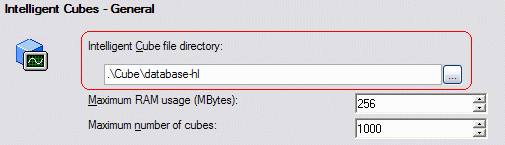
  • Locate the Intelligent Cube directory, found in the Project Configuration panel under Intelligent Cubes > General. If the path begins with a dot, the directory will be found in the Intelligence Server installation directory. In Windows, this is Program Files\Strategy\Intelligence Server\Cube\; in UNIX, /IntelligenceServer/Cube/.

ka04W000000OfggQAC_0EM440000002E9A.gif
  • While viewing Project Configuration, verify the project GUID under Project definition > General. The GUID is part of the project's Intelligent Cube directory path.
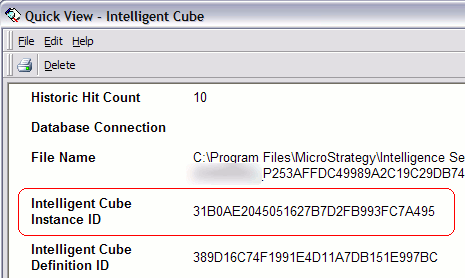
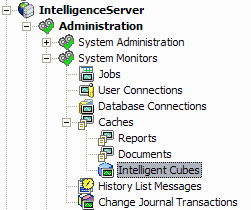
  • Go to the Intelligent Cube monitor to identify the cube instance ID: under the three-tier project source, Administration > System Monitors > Caches > Intelligent Cubes. Locate the published cube, right-click on it and choose Quick View. The ID is found with the heading "Intelligent Cube Instance ID."

ka04W000000OfggQAC_0EM440000002E98.gif
ka04W000000OfggQAC_0EM440000002bxK.gif
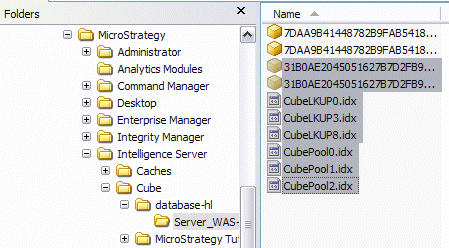
  • Go to the Intelligent Cube directory found in step 1. Inside, there will be folders named after Intelligence Server machines(s) and project IDs. The necessary files will be found under the project ID and Intelligence Server machine where the cube was published. Note that the selected files include two files matching the Intelligent Cube Instance ID shown above, and all *.idx files.

ka04W000000OfggQAC_0EM440000002E94.gif
  • Zip the selected files into an archive.
  • Provide the archive and database backup of the metadata to Strategy Technical Support.

NOTE: If the cache "Backup frequency" setting under Intelligence Server Configuration > Server Definition > Advanced is greater than 0, it may be necessary to stop the Intelligence Server before collecting the files. Stopping the server would ensure that any cube information not yet persisted to disk would be written.
Restoring cube files
The following procedure will make cube data accessible to view reports.

  1. Configure and start the Intelligence Server using the metadata backup.
  2. Log into the server and go to the Intelligent Cube monitor (Administration > System Monitors > Caches > Intelligent Cubes). This will create the Intelligent Cube directories.
  3. Shut down the server.
  4. Extract the archive into the appropriate location on disk.
  5. Restart the Intelligence Server.
  6. Verify that the cubes are available by revisiting the Intelligent Cube monitor.

If the cubes are visible in the Intelligent Cube Monitor, it should then be possible to execute reports against the Intelligent Cubes.
If the cubes are not accessible but the files are in the right place, it could be due to an incompatibility between the operating system where the cubes were published and the operating system where they were restored. It is not always necessary to match operating systems, but it could be a factor if the cubes are not available as expected.


Comment

0 comments

Details

Knowledge Article

Published:

April 5, 2017

Last Updated:

November 8, 2017