EducationSoftwareStrategy.com
StrategyCommunity

Knowledge Base

Product

Community

Knowledge Base

TopicsBrowse ArticlesDeveloper Zone

Product

Download SoftwareProduct DocumentationSecurity Hub

Education

Tutorial VideosSolution GalleryEducation courses

Community

GuidelinesGrandmastersEvents
x_social-icon_white.svglinkedin_social-icon_white.svg
Strategy logoCommunity

© Strategy Inc. All Rights Reserved.

LegalTerms of UsePrivacy Policy
  1. Home
  2. Topics

KB32837: What is the maximum character length that a history list message can be renamed to in MicroStrategy Web.


Community Admin

• Strategy


The history list message in MicroStrategy Web can be renamed to a maximum of 255 characters including spaces; however, MicroStrategy has a 250 character limitation for saving report names.

Strategy Web allows users to rename the actual history list message on their inbox, without renaming the original report, as described in KB20866: How to Rename History List Messages in MicroStrategy Web 9.0.
The history list message in Strategy Web can be renamed to a maximum of 255 characters including spaces. Any character after the preset limit will be automatically cut off.
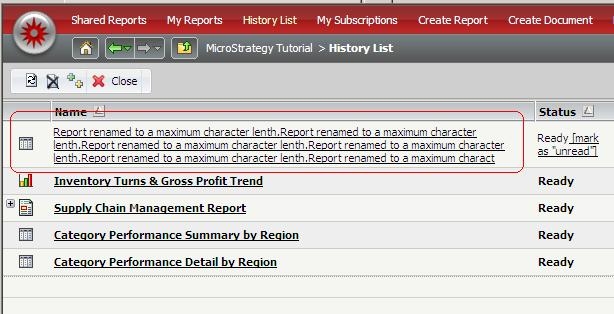
ka04W000000uG9LQAU_0EM44000000283E.jpeg

 
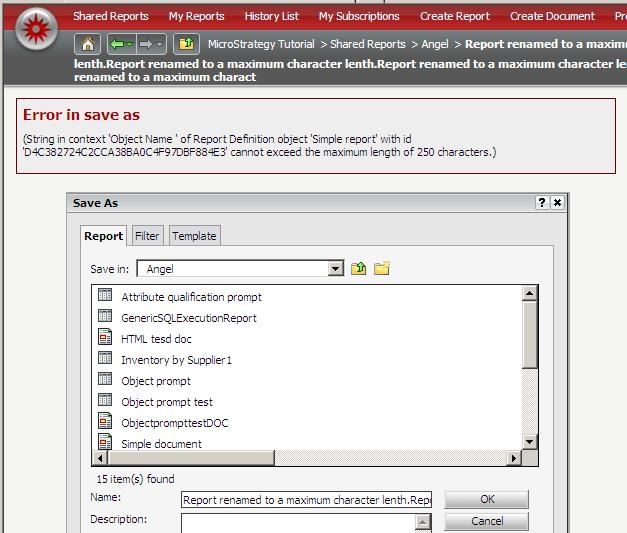
However, even though the history list message can be renamed to a 255 character name successfully, if the user wants to save this renamed report after running it, Strategy has a 250 character limitation for saving report names, and will see the following message:
ka04W000000uG9LQAU_0EM44000000283C.jpeg

Therefore the maximum limit in general that a report's name can be set to is 250 characters.


Comment

0 comments

Details

Knowledge Article

Published:

June 14, 2017

Last Updated:

June 14, 2017