Note: Starting in Strategy 11.0, the behavior has been changed and the Intelligence Server does not use Messaging Services by default. For more details, see KB442160.
Beginning in Strategy 10.5 (on Linux) and 10.6 (on Windows), Strategy Messaging Services uses the third-party Kafka framework to handle the DSSErrors logging output from the Intelligence Server process. Eventually, logging for all Strategy software as well as usage statistics and other information will use Strategy Messaging Services to consolidate all logging into a central location (even across different machines on a network). Use of Strategy Messaging Services requires running some additional services; these services (Apache Kafka, Apache Zookeeper, and the Kafka Consumer) will automatically be installed, configured, and started during the Intelligence Server installation. This Knowledge Base article will describe how to manually start, stop, and check the status of these services.
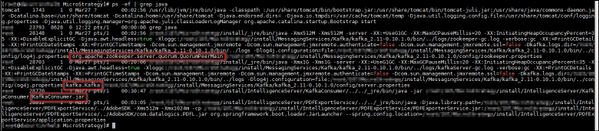
All three services are java based, so a single command that can check status for all three at once is:
# ps -ef | grep java
To check status for each service individually, more specific commands can be used:
# ps -ef | grep kafka.Kafka
# ps -ef | grep zookeeper.server
# ps -ef | grep KafkaConsumer
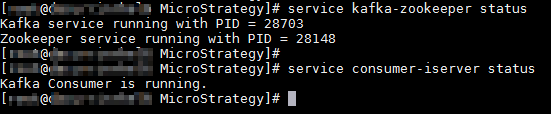
# service kafka-zookeeper status
# service consumer-iserver status
To start the services manually in Strategy 10.5 and 10.6, use the following commands (the Zookeeper service should be started first):
# <INSTALL_PATH>/MessagingServices/Kafka/kafka_2.11-0.9.0.1/bin/zookeeper-server-start.sh -daemon <INSTALL_PATH>/MessagingServices/Kafka/kafka_2.11-0.9.0.1/config/zookeeper.properties
# <INSTALL_PATH>/MessagingServices/Kafka/kafka_2.11-0.9.0.1/bin/kafka-server-start.sh -daemon <INSTALL_PATH>/MessagingServices/Kafka/kafka_2.11-0.9.0.1/config/server.properties
# nohup <INSTALL_PATH>/jre/bin/java -jar <INSTALL_PATH>/jar/KafkaConsumer.jar -silent-kh 127.0.0.1 -kp 9092 -p <LOG_PATH>/DSSErrors > <LOG_PATH>/KafkaConsumer.log 2>&1
# <INSTALL_PATH>/IntelligenceServer/KafkaConsumer/KafkaConsumer.sh start
# service kafka-zookeeper start
# service consumer-iserver start
# <INSTALL_PATH>/MessagingServices/Kafka/kafka_2.11-0.9.0.1/bin/zookeeper-server-stop.sh
# <INSTALL_PATH>/MessagingServices/Kafka/kafka_2.11-0.9.0.1/bin/kafka-server-stop.sh
# <INSTALL_PATH>/IntelligenceServer/KafkaConsumer/KafkaConsumer.sh stop
# service kafka-zookeeper stop
# service consumer-iserver stop
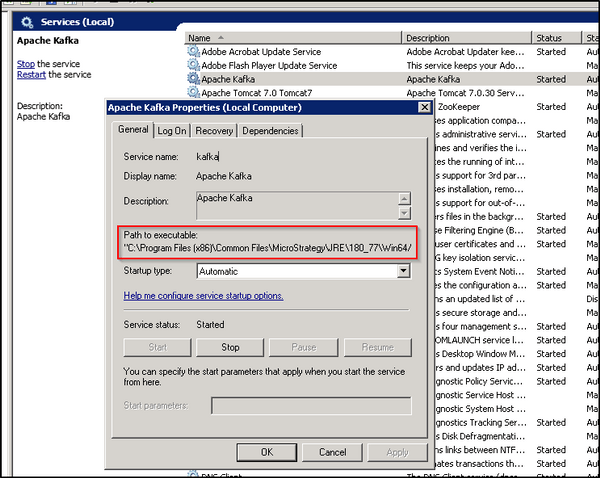
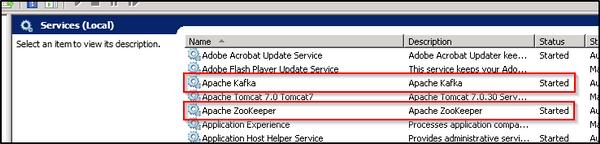
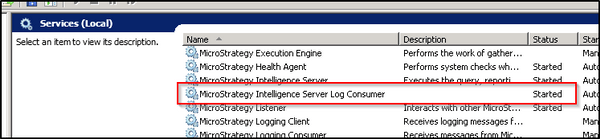
On Windows the three services will be controlled through the Windows Services dialog (services.msc). The names (and short names) of the services are:
Apache Kafka (kafka)
Apache ZooKeeper (zookeeper)
Strategy Intelligence Server Log Consumer (MSTR_KafkaConsumer)
The services can be started and stopped using the controls provided by the Windows Services dialog.
As it may be possible that non-Strategy related instances of Kafka or Zookeeper might be installed or running on the machine, care should be taken to verify that the path of the running process(es) corresponds to the path of the Strategy installation before interacting with the services.