EducationSoftwareStrategy.com
StrategyCommunity

Knowledge Base

Product

Community

Knowledge Base

TopicsBrowse ArticlesDeveloper Zone

Product

Download SoftwareProduct DocumentationSecurity Hub

Education

Tutorial VideosSolution GalleryEducation courses

Community

GuidelinesGrandmastersEvents
x_social-icon_white.svglinkedin_social-icon_white.svg
Strategy logoCommunity

© Strategy Inc. All Rights Reserved.

LegalTerms of UsePrivacy Policy
  1. Home
  2. Topics

KB442160: New behavior in MicroStrategy 11.0: Intelligence Server does not use Messaging Services for logging by default


David Currin

Quality Engineer, Senior • MicroStrategy


This article discusses a logging behavior change in MicroStrategy 11.0 and how to configure the logging behavior to the desired setting

Beginning in Strategy 11.0, Strategy Intelligence Server does not use Strategy Messaging Services to handle the DSSErrors logging output from the Intelligence Server process and other processes by default.  The use of Messaging Services for DSSErrors logging is now controlled by a feature flag and can be enabled or disabled as desired.  If Messaging Services is not enabled for DSSErrors logging, the Intelligence Server and other processes will log directly to file logs as in Strategy versions 10.5 and earlier.
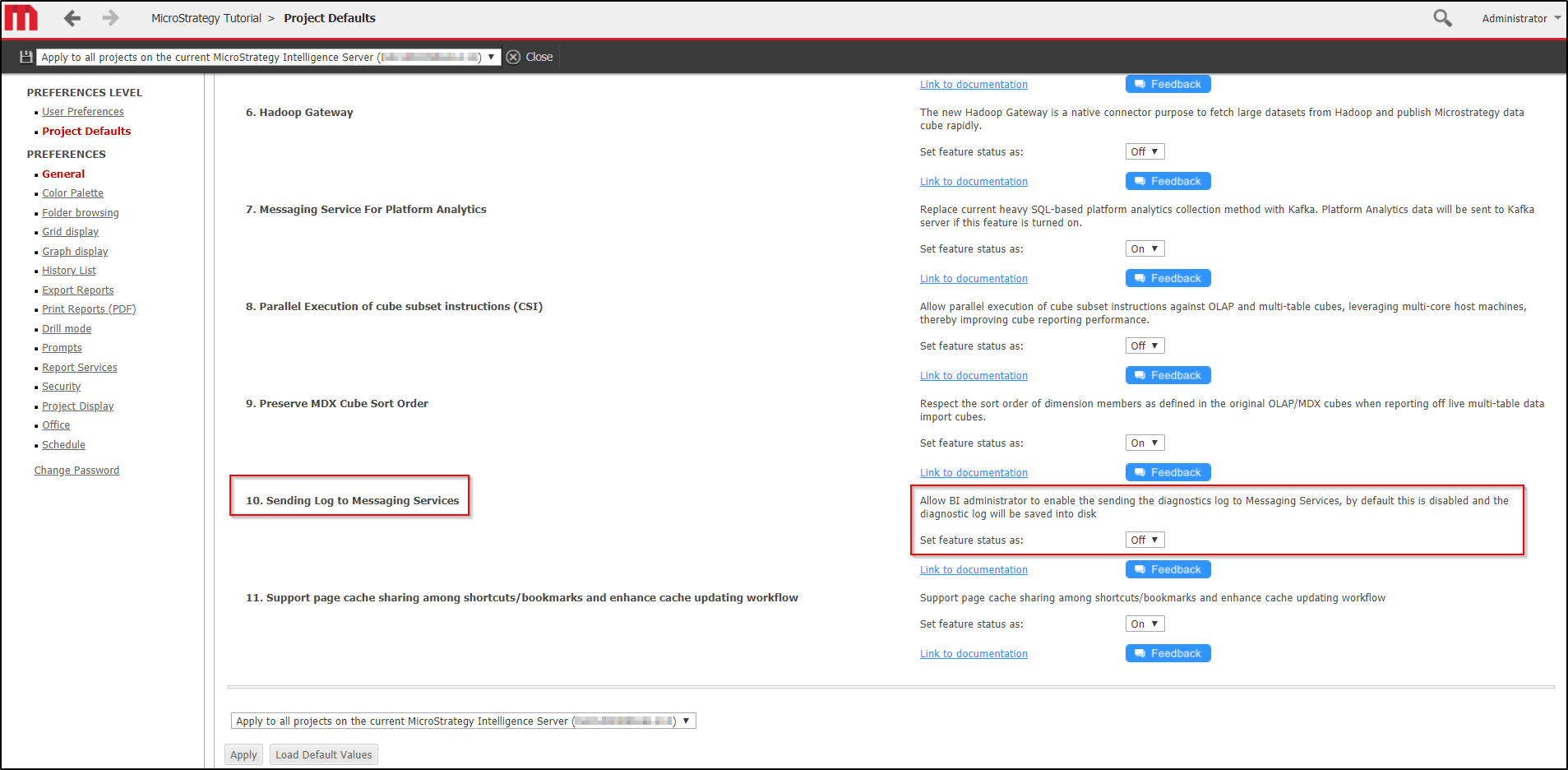
If desired, Messaging Services for DSSErrors may be enabled through a feature flag located in Strategy Web Preferences > Project Defaults.  To enable it, set the feature status for 10. Sending Log to Messaging Services to On.
ka04W000001IqowQAC_0EM44000000R8ZO.png

Additionally, for Messaging Services to be able to write to the DSSErrors.log file, the Intelligence Server Log Consumer service must be running.  If Strategy processes were registered as services at the time of installation, the Log Consumer service may be started by running the command:


service Strategy consumer-iserverstart

If Strategy processes were not registered as services at the time of installation, the Log Consumer service may be started by running the command:
 

/<MSTR_INSTALL>/IntelligenceServer/KafkaConsumer/KafkaConsumer.sh start

For more information on Strategy Messaging Services, see the following Knowledge Base articles:
KB328864: How to enable and disable MicroStrategy Messaging Services (Kafka) logging for the Intelligence Server in MicroStrategy 10.5 and higher versions on Windows and Linux
KB328852: How to start and stop MicroStrategy Messaging Services (Kafka) in MicroStrategy 10.5 and higher versions on Windows and Linux
KB442160


Comment

0 comments

Details

Knowledge Article

Published:

October 24, 2018

Last Updated:

October 25, 2018