Note: Starting in Strategy 11.0, the behavior has been changed and the Intelligence Server does not Messaging Services by default. For more details, see KB442160.
Beginning in Strategy 10.5 (on Linux) and 10.6 (on Windows), Strategy Messaging Services uses the third-party Kafka framework to handle the DSSErrors logging output from the Intelligence Server process. Eventually, logging for all Strategy software as well as usage statistics and other information will use Strategy Messaging Services to consolidate all logging into a central location (even across different machines on a network).
Whether the Intelligence Server uses Strategy Messaging Services or writes directly to the DSSErrors.log (as in pre-10.5 behavior) is a setting controlled at the Server Definition level. By default, any Server Definition created newly in 10.5 (on Linux) or 10.6 (on Windows) and later versions will have Strategy Messaging Services enabled. Previous Server Definitions that were created in Strategy versions earlier than 10.5 will not have Strategy Messaging Services enabled, but it can be enabled for these Server Definitions via Command Manager if desired.
Prior to configuring the Server Definition to use Strategy Messaging Services, the three supporting Kafka services (Apache Kafka, Apache Zookeeper, and the Kafka Consumer) must be running.
Refer to the following Strategy Knowledge Base article for details:
KB328852: How to start and stop MicroStrategy Messaging Services (Kafka) in MicroStrategy 10.5 and higher versions on Windows and Linux
To check whether Strategy Messaging Services is currently enabled, connect to the desired project source in Command Manager and run the following command:
LIST ALL PROPERTIES FOR SERVER CONFIGURATION;
Messaging Services enabled = <TRUE/FALSE>
To enable Strategy Messaging Services and configure the Intelligence Server to handle logging via Kafka, connect to the desired project source in Command Manager and run the following command:
ALTER SERVER CONFIGURATION ENABLEMESSAGINGSERVICES TRUE;
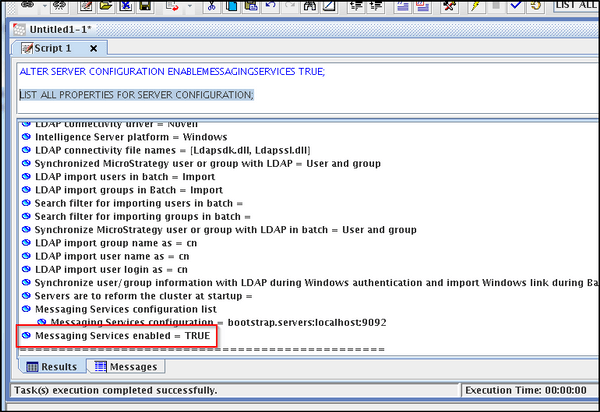
The Intelligence Server logging output will now be directed to the Kafka service, and will be written to the Kafka Consumer's target output file (by default, this will be <LOG_PATH>/DSSErrors/DSSErrors.log). If at any point the Intelligence Server is unable to communicate with the Kafka service, the logging output will be directed back to the standard DSSErrors.log file.
Execute the following command from Command Manager:
ALTER FEATURE FLAG “Sending Log to Messaging Services” ON;
To disable Strategy Messaging Services and configure the Intelligence Server to write directly to the DSSErrors.log file (as in pre-10.5 behavior), connect to the desired project source in Command Manager and run the following command:
ALTER SERVER CONFIGURATION ENABLEMESSAGINGSERVICES FALSE;
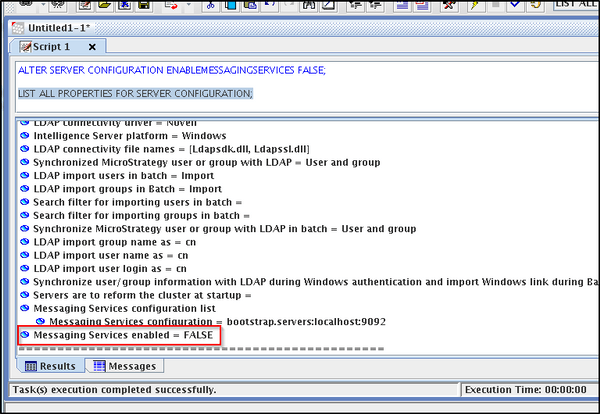
The Intelligence Server logging output will now be directed to the standard DSSErrors.log file (<LOG_PATH>/DSSErrors.log).
