EducationSoftwareStrategy.com
StrategyCommunity

Knowledge Base

Product

Community

Knowledge Base

TopicsBrowse ArticlesDeveloper Zone

Product

Download SoftwareProduct DocumentationSecurity Hub

Education

Tutorial VideosSolution GalleryEducation courses

Community

GuidelinesGrandmastersEvents
x_social-icon_white.svglinkedin_social-icon_white.svg
Strategy logoCommunity

© Strategy Inc. All Rights Reserved.

LegalTerms of UsePrivacy Policy
  1. Home
  2. Topics

KB33132: MicroStrategy Distribution Services cannot deliver email reporting a "Must issue a STARTTLS command first" error in the DSSErrors.log


Community Admin

• Strategy


This KB article discusses a known limitation with Distribution Services.

SYMPTOM:
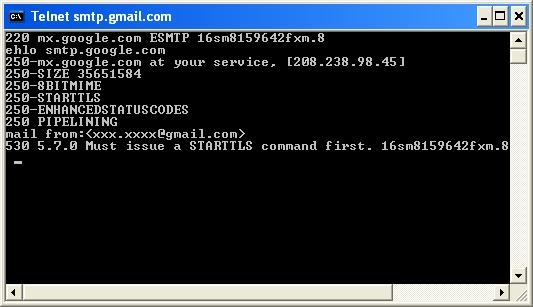
When configuring Strategy Distribution Services to use an SMTP server that requires a TLS connection (such as Google's public SMTP server), emails will are not delivered. Testing the SMTP server by manually sending the email through telnet also does not work, producing the following error: Must Issue a STARTTLS command first.
ka04W00000148J4QAI_0EM440000002Arn.jpeg


        220 mx.google.com ESMTP 16sm8159642fxm.8

        ehlo smtp.google.com

        250-mx.google.com at your service,

        250-SIZE 35651584

        250-8BITMIME

        250-STARTTLS

        250-ENHANCEDSTATUSCODES

        250 PIPELINING

        mail from:xxx.xxxx@gmail.com

        530 5.7.0 Must issue a STARTTLS command first. 16sm8159642fxm.8

 
CAUSE:
The SMTP server is configured to require incoming connections to be upgraded to TLS (Transport Layer Security) before it will allow mail to be sent.
Transport Layer Security is a security layer that is applied on top of the standard Simple Mail Transfer Protocol (SMTP). In Strategy 9.x, Distribution Services is unable to issue the necessary commands to interface with any mail server requiring TLS. In Strategy 10.x, Distribution Services will make use of TLS if SMTP authentication is configured.
 
ACTION:
If on Strategy 9.x, upgrade to Strategy 10.x or higher to take advantage of the new functionality.
If on Strategy 10.x or higher, configure the email device to use SMTP authentication by adding a username and password for the SMTP account.  See KB245811: New feature in MicroStrategy 10 Secure Enterprise: SMTP Authentication for more information on configuring the email device to use SMTP authentication.
Article reference:   KB33132


Comment

0 comments

Details

Knowledge Article

Published:

June 5, 2017

Last Updated:

November 17, 2020