SYMPTOM:
LDAP connectivity when testing SSL fails with the error below on Strategy Intelligence Server 9.x running on Linux platforms:
Sample Code/Error
An error occurred during authentication. Please contact your administrator: required LDAP components could not be found or are not v3 compliant
After further investigation, the following errors can be observed in the Authentication Server > Trace diagnostic trace log at the moment the connectivity test fails:
Sample Code/Error
2010-03-30 12:00:00.620-05:00 LDAP authentication trace: failure in initializing certificate '<certificate path>'. (LDAP error Unknown error: %4)
2010-03-30 12:00:00.623-05:00 Failure to initialize a LDAP session to server '<LDAP Server IP address>'.
CAUSE:
A possible cause for this issue is that the incorrect LDAP SDK library is specified in the 'LDAP connectivity file names' parameter of the Strategy Intelligence Server Configuration > LDAP > Platform section:
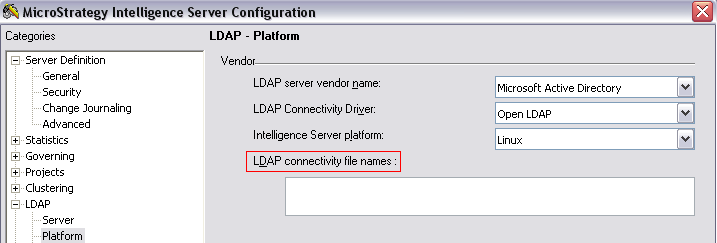
ACTION:
Ensure the correct LDAP SDK library is specified. The OpenLDAP 64-bit SDK is the certified LDAP SDK for Strategy Intelligence Server 9.x running on Linux platforms. The default OpenLDAP library is 'libldap.so', but other variations of the library are possible (for example, 'libldap-2.2.so.7').
For more information on configuring LDAP authentication with Strategy Intelligence Server on Linux platforms, refer to KB12067: How to configure LDAP connectivity using Clear text (using OpenLDAP) or SSL (using OpenSSL) for MicroStrategy Intelligence Server 9.x-10.x on Linux.
