EducationSoftwareStrategy.com
StrategyCommunity

Knowledge Base

Product

Community

Knowledge Base

TopicsBrowse ArticlesDeveloper Zone

Product

Download SoftwareProduct DocumentationSecurity Hub

Education

Tutorial VideosSolution GalleryEducation courses

Community

GuidelinesGrandmastersEvents
x_social-icon_white.svglinkedin_social-icon_white.svg
Strategy logoCommunity

© Strategy Inc. All Rights Reserved.

LegalTerms of UsePrivacy Policy
  1. Home
  2. Topics

KB33605: How to define a Translation Table with records excluding particular objects using MicroStrategy Repository Translation Wizard


Community Admin

• Strategy


This KB addresses how to define a Translation Table with records excluding particular objects using MicroStrategy Repository Translation Wizard.

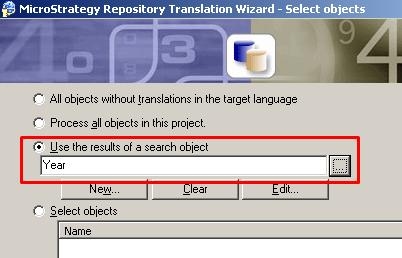
The Strategy Repository Translation Tool generates a Translation Table for objects for which additional language support needs to be added. This tool supports the Search feature with which the objects to be translated can be limited. While there are four options to limit the objects to be translated as shown below, it is not possible to set the operator for Search results to be defined with 'Not In' or 'Different From' operators. 

ka04W00000148ksQAA_0EM440000002HSL.jpeg

 
This means that the condition can be defined to limit the object to be found while there is no option to exclude objects by specifying a condition. This KB provides a simple step to workaround this limitation.
 
WORKAROUND:

  • Create a Translation Table using Repository Translation Tool with the second option in the screenshot: Process all objects in this project. Save the Table as T_All_Objects.
ka04W00000148ksQAA_0EM440000002HSH.jpeg
  •  
    Notice the Translation Table is created with 6 rows.
ka04W00000148ksQAA_0EM440000002HSP.jpeg
  • Using Repository Translation Wizard again, this time, create a Translation Table with Search like this. In this example, "Year" is used as a string to limit the objects to be translated. Then, save the Table as T_Year_Only
ka04W00000148ksQAA_0EM440000002HSJ.jpeg
  •  
    Notice the Translation Table is created with 331 rows:
ka04W00000148ksQAA_0EM440000002HSO.jpeg
  • After two table created in the same Database, create another table based on these two table using following SQL. (Note: This SQL is for SQL Server. Please work with your DBA to adjust the syntax for your database.)


    Sql
    SELECT * INTO T_Except_Year
    FROM T_All_Objects
    
    where OBJECTID NOT IN (select OBJECTID from T_Year_Only)
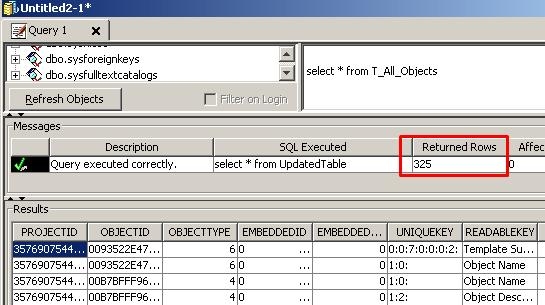


    Check the number of rows for T_Except_Year and confirm 325 rows returned. (i.e., 331 - 6 = 325)
     
ka04W00000148ksQAA_0EM440000002HSI.jpeg

  
For another approach of importing only a subset of objects into the metadata, please refer to:

  • KB30191: How to import only a subset of objects into the metadata using the Repository Translation Wizard 9.x

Comment

0 comments

Details

Knowledge Article

Published:

May 11, 2017

Last Updated:

May 11, 2017