In cases when the Strategy Intelligence Server process shuts down unexpectedly, Microsoft Auto Dump Plus utility can be used to collect a crash dump. For more information on using the ADPlus utility, refer to the following Strategy Knowledge Base document:
KB10408: How to use the Microsoft AutoDump Plus with Strategy Intelligence Server 9.x and 10.x?
However, in some cases, the ADPLus utility just captures the process shutdown dump and does not capture information regarding the actual issue that caused the unexpected shutdown.
This document provides instructions on how to utilize Windows Error Reporting (WER) to capture debugging information for a Strategy Intelligence Server process running on a Microsoft Windows Server 2003 operating system.
For information on how to utilize the WER feature on Windows Server 2008, refer to the following Strategy Knowledge Base document:
KB33429: How to use the Windows Server 2008 Windows Error Reporting (WER) feature with MicroStrategy Intelligence Server 9.x and 10.
To enable the WER utility, implement the steps below:
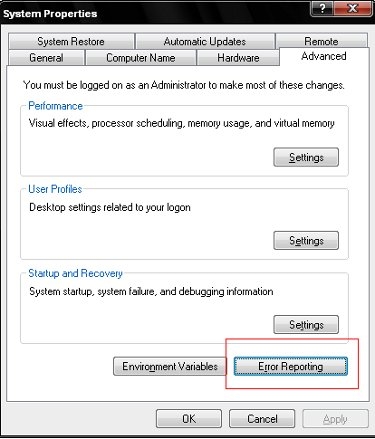
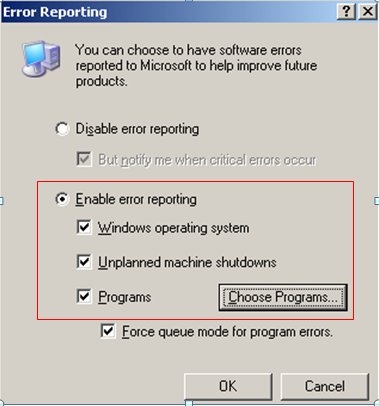
Error Reporting dumps the memory into two dump files everytime an application crashes. One is a HDMP file which is an uncompressed version of the memory dump while the other is a MDMP file which is a compressed version of the memory dump file. These dump files get created under C:\WINDOWS\PCHealth\ERRORREP\UserDumps. Send both these files to Strategy Technical Support for analysis.
