EducationSoftwareStrategy.com
StrategyCommunity

Knowledge Base

Product

Community

Knowledge Base

TopicsBrowse ArticlesDeveloper Zone

Product

Download SoftwareProduct DocumentationSecurity Hub

Education

Tutorial VideosSolution GalleryEducation courses

Community

GuidelinesGrandmastersEvents
x_social-icon_white.svglinkedin_social-icon_white.svg
Strategy logoCommunity

© Strategy Inc. All Rights Reserved.

LegalTerms of UsePrivacy Policy
  1. Home
  2. Topics

KB33906: Conditional Formatting for metric values do not keep the specified formatting with MicroStrategy Developer and Web 9.4.x-10.x


Stefan Zepeda

Salesforce Solutions Architect • Strategy


Conditional Formatting option allows users to change the display of value in each row depending on the metric value.

SYMPTOM:
Conditional Formatting option allows users to change the display of value in each row depending on the metric value. For general instruction for how this feature works, please refer to:KB11941: How to use conditional formatting thresholds on individual report objects in a MicroStrategy Report Services 8.x and 9.x document
Note: Graphic User Interface in version 9.0.x has changed. However, the explanation for each option is valid to version 9.0.x.
Suppose conditional formatting is specified as follows:
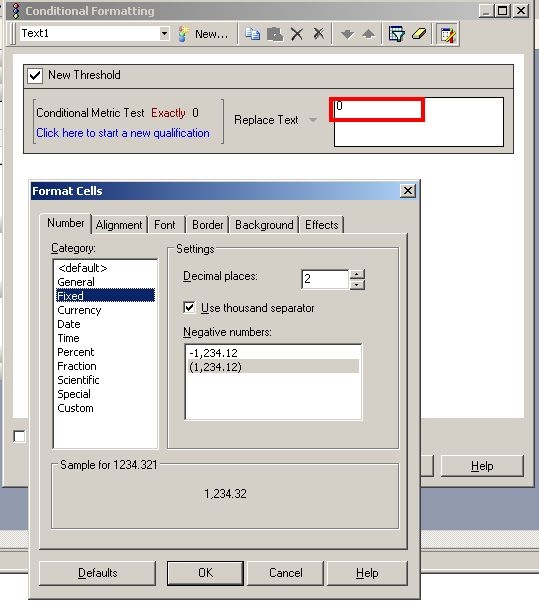
  • When Test column returns a value of 0, then, Replace Text with "0".
  • Specify 2 as decimal places.
ka04W000001IqGuQAK_0EM440000002E1S.jpeg

 
However, when the report is executed, 0 appears as 0, not as 0.00.
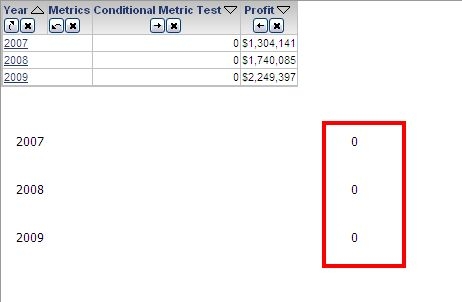
ka04W000001IqGuQAK_0EM440000002E1Q.jpeg

 
CAUSE:
The is working as designed, since the Replace Text threshold was designed to change numbers into strings. Even though numbers are entered there, they are treated as strings.
 
ACTION:
Manually specify decimal points like "0.00."
For more information about related topic, please refer to: 
KB18591: ‘Replace Text’ option in thresholds will cause exported cells in Microsoft Excel appear formatted as text even when the replaced text is a number in Microstrategy Desktop and Web 8.1.x


Comment

0 comments

Details

Knowledge Article

Published:

April 19, 2017

Last Updated:

April 19, 2017