EducationSoftwareStrategy.com
StrategyCommunity

Knowledge Base

Product

Community

Knowledge Base

TopicsBrowse ArticlesDeveloper Zone

Product

Download SoftwareProduct DocumentationSecurity Hub

Education

Tutorial VideosSolution GalleryEducation courses

Community

GuidelinesGrandmastersEvents
x_social-icon_white.svglinkedin_social-icon_white.svg
Strategy logoCommunity

© Strategy Inc. All Rights Reserved.

LegalTerms of UsePrivacy Policy
  1. Home
  2. Topics

KB35109: "Error type: Odbc error. Odbc operation attempted: SQLExecDirect. [HYT00:0: on SQLHANDLE] [MicroStrategy][ODBC Oracle Wire Protocol driver]Timeout expired" is shown when executing reports.


Community Admin

• Strategy


This article describes how to fix the error of "SQL Generation CompleteIndex out of range" and "Timeout expired" when executing reports in MicroStrategy.

SYMPTOM

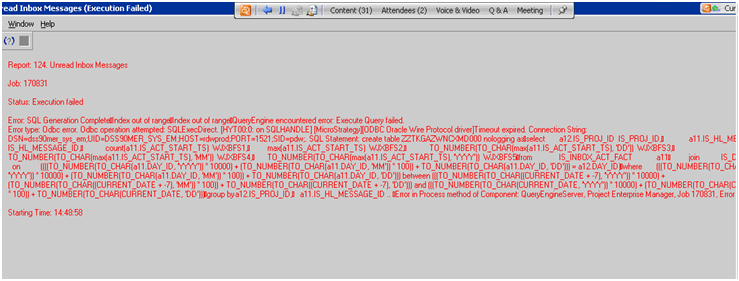
When trying to execute some reports in Strategy, error "SQL Generation CompleteIndex out of range" and "Timeout expired" may received:
ka0PW0000000rU9YAI_0EM440000002Akf.png

Same error can be found in the DSSError.log:


2010-12-07 14:49:05.755-06:00 (SQL Generation CompleteIndex out of rangeIndex out of rangeQueryEngine encountered error: Execute Query failed.Error type: Odbc error. Odbc operation attempted: SQLExecDirect. Timeout expired.

CAUSE

One possible cause is that the Strategy Intelligence Server using a cached database connection that was already dropped by the RDBMS.
 

ACTION

Delete cached Database connection. In addition, change the settings for the "Connection lifetime" and the "Connection idle time out". Follow the steps below to perform the mentioned changes:

  • Go to Administration > System Monitors > Database Connections, remove all the Database connection caches.
  • Go to Administration > Configuration Managers > Database Instances > Open the Database Instance that is getting the error.
  • Under the General tab, go to Database connection > Select the connection > click on "Modify" > In the Database Connections window > Go to the Advanced tab > under Connection Caching > Set "connection lifetime" and the "connection idle time out" to 0 (zero) seconds.
  • Restart Strategy Intelligence Server.

Refer to Knowledge Base document below for additional information about connection settings:
KB5598: What are the "Connection lifetime" and "Connection Idle Timeout" options under the Database Connection Caching section in MicroStrategy Intelligence Server?


Comment

0 comments

Details

Knowledge Article

Published:

April 26, 2017

Last Updated:

February 26, 2024