EducationSoftwareStrategy.com
StrategyCommunity

Knowledge Base

Product

Community

Knowledge Base

TopicsBrowse ArticlesDeveloper Zone

Product

Download SoftwareProduct DocumentationSecurity Hub

Education

Tutorial VideosSolution GalleryEducation courses

Community

GuidelinesGrandmastersEvents
x_social-icon_white.svglinkedin_social-icon_white.svg
Strategy logoCommunity

© Strategy Inc. All Rights Reserved.

LegalTerms of UsePrivacy Policy
  1. Home
  2. Topics

KB35261: The 'Alert' option does not appear when attempting to create an alert-based subscription in MicroStrategy Distribution Services 9.x and 10.x


Community Admin

• Strategy


The 'Alert' option does not appear when attempting to create an alert-based subscription in MicroStrategy Distribution Services.

SYMPTOM:
In Strategy Distribution Service 9.x and 10.x, it is possible to create an alert-based subscription. This is described in the following Strategy Knowledge Base technical note:
KB34054: How to create an alert-based subscription in MicroStrategy 9.x Distribution Services
However, when right-clicking the metric header of a report in Strategy Web 9.0.x, the 'Alerts' option does not appear:
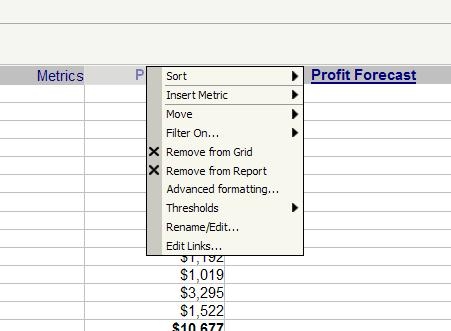
 

ka04W00000148dlQAA_0EM440000002Ak5.jpeg


CAUSE:
This issue occurs because the user attempting to create the alert does not have all of the necessary privileges.
 
 
ACTION:
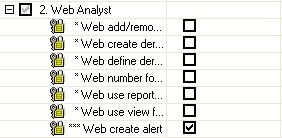
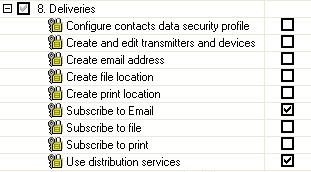
In order to create an alert-based subscription, the following privileges are required:
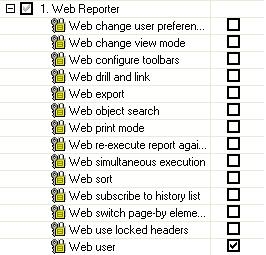
  • Web Reporter > Web user
ka04W00000148dlQAA_0EM440000002Ajz.jpeg
  • Web Analyst > Web create alert
     
ka04W00000148dlQAA_0EM440000002Ak3.jpeg
  • Deliveries > Use distribution services
    Deliveries > Subscribe to Email
     
ka04W00000148dlQAA_0EM440000002Ak1.jpeg

 
Once these privileges have been applied, an alert-based subscription can be created.


Comment

0 comments

Details

Knowledge Article

Published:

June 13, 2017

Last Updated:

June 13, 2017