SYMPTOM:
During the process of upgrading the Intelligence Server metadata components to Strategy 9.x, the following warning message is shown:
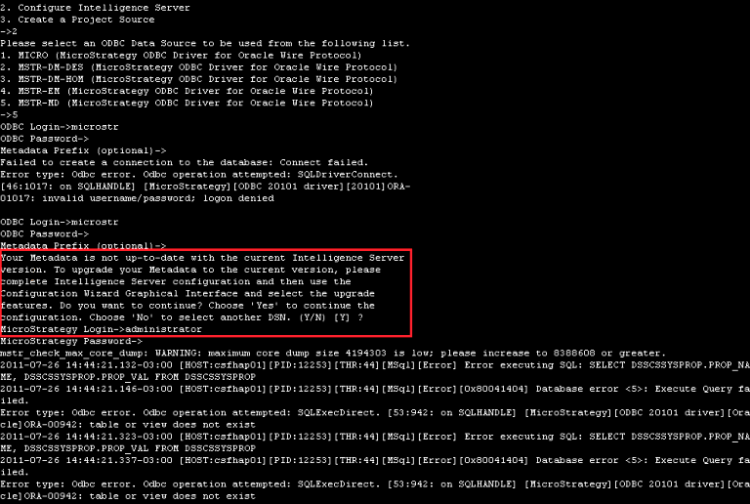
To upgrade the Metadata to the current version, please complete the Intelligence Server configuration and then use the Configuration Wizard Graphical Interface and select the upgrade features.
CAUSE:
Currently, Strategy 9.x has only graphical interface for upgrading metadata features. However, an enhancement request was already logged to the Technology Team in order to have Strategy Configuration Wizard to support metadata features upgrade via command line on UNIX environments.
ACTION:
There are two workarounds for upgrading the Intelligence Server metadata components to Strategy 9.x on UNIX via command line:
1 - Use the Strategy Configuration Wizard graphical interface; for example, use a Microsoft Windows work station for performing the metadata features upgrade.
2 - Create a response file by using the Strategy Configuration Wizard graphical interface through a Microsoft Windows work station, and then execute the Configuration Wizard via command line in UNIX-based Operating Systems.For further information, please refer to the following tech note: KB33120: How to perform a silent upgrade of MicroStrategy metadata in MicroStrategy 9.2.x and above.
