EducationSoftwareStrategy.com
StrategyCommunity

Knowledge Base

Product

Community

Knowledge Base

TopicsBrowse ArticlesDeveloper Zone

Product

Download SoftwareProduct DocumentationSecurity Hub

Education

Tutorial VideosSolution GalleryEducation courses

Community

GuidelinesGrandmastersEvents
x_social-icon_white.svglinkedin_social-icon_white.svg
Strategy logoCommunity

© Strategy Inc. All Rights Reserved.

LegalTerms of UsePrivacy Policy
  1. Home
  2. Topics

KB37796: "Draw Categories in Reverse Order" option in bar graph doesn't work when viewing the document with that graph in flash mode in MicroStrategy Web


Community Admin

• Strategy


"Draw Categories in Reverse Order" option in bar graph doesn't work when viewing the document with that graph in flash mode in MicroStrategy Web.

SYMPTOM:
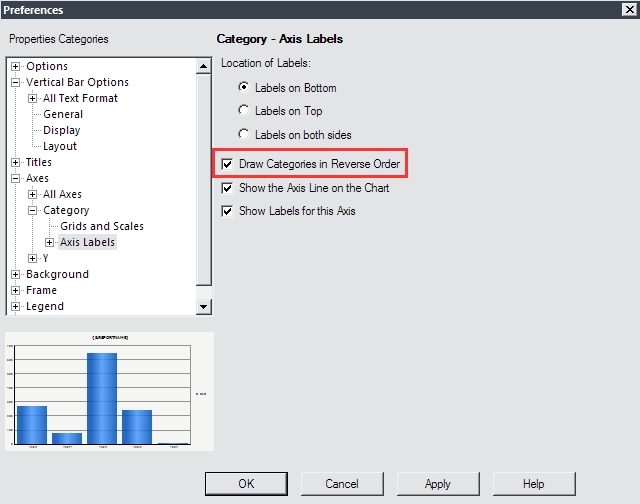
In Strategy Developer 9.4.1, users may enable the "Draw Categories in Reverse Order" option on a bar graph, which will cause categories to show sorted opposite of their grid sort order. The option can be enabled in Graph Options, like shown below:
 

ka04W00000148hbQAA_0EM4400000027TT.jpeg

 
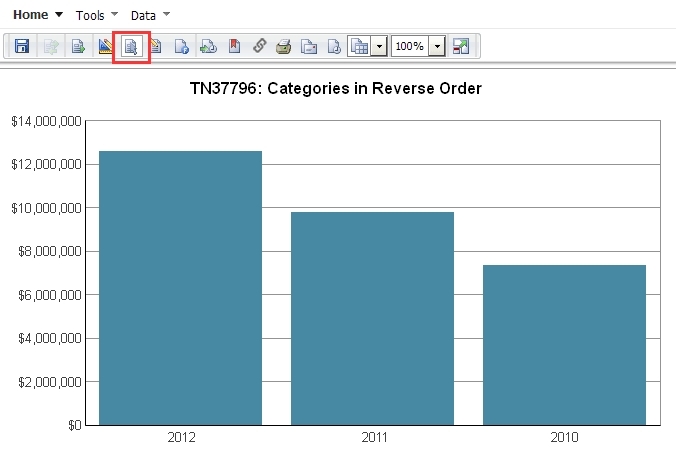
When the document containing the graph object is executed in DHTML mode, the bars show in reverse order, as expected:
ka04W00000148hbQAA_0EM4400000027TM.jpeg

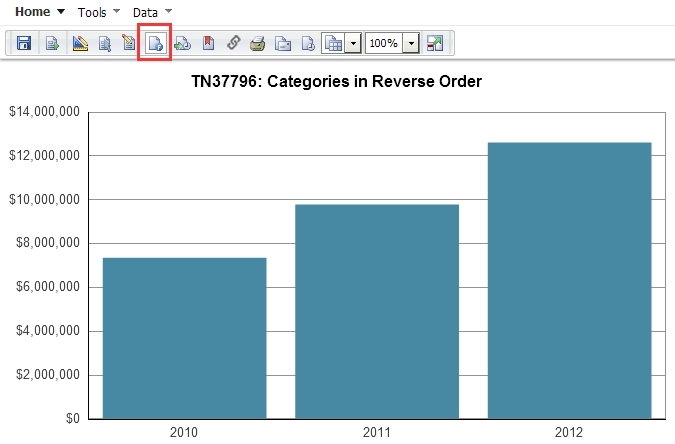
However, users may find that when the same document is executed in Flash mode, the bars do not show in reverse order, like shown below:
 

ka04W00000148hbQAA_0EM4400000027TV.jpeg

STEPS TO REPRODUCE:

  1. Create a report with Year in the rows and Cost in the column
  2. Add this report onto a report services document as a Vertical Bar Graph
  3. In Strategy Desktop or Developer, enter Graph Options for the graph > Axes > Category > Axis Labels and enable "Draw Categories in Reverse Order"
  4. Save and execute the document in Flash mode

CAUSE:
This is a known issue in Strategy Web 9.4.1.
 
ACTION:
As seen in article KB258357: New in MicroStrategy 10.1 - Single View Mode for Documents: Presentation Mode, with the release of Strategy 10.1, the simplification process of available report services document view modes has been initiated. Interactive and Flash view modes are being deprecated, making Express view mode the only available view mode for upcoming Strategy releases. Since this issue doesn't occur in Presentation Mode, it is recommended to use this mode instead.


Comment

0 comments

Details

Knowledge Article

Published:

June 13, 2017

Last Updated:

June 13, 2017