For information on how to force the Strategy Engine to create temporary tables in a location different from that of the project warehouse against databases other than Netezza, refer to the following Knowledge Base article:
KB4319 - How to force the Strategy Engine to create temporary tables in a location different from that of the project warehouse
Netezza only allows users to select from other databases but not create things in them. Thus the solution mentioned in the Knowledge Base article above does not work.
Follow the steps below to create temporary tables in a database different from the project's warehouse repository against Netezza database:
1. In Project Configuration Editor, configure the database instance of warehouse to be the database repository that can't create temporary table.
2. Open Warehouse Catalog, select all tables from the warehouse repository on the right side, Right-Mouse-Click on them and select "Table Prefix". Set the table prefix to be "databasename.username". Save and close it.
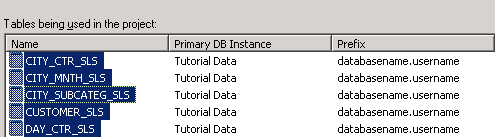
3. In Project Configuration Editor, edit the database instance of warehouse, and set its database connection to be the new database which has the permission to create temporary tables.
4. Perform "Update Schema".
The idea behind is to first load all the warehouse tables in Warehouse Catalog from the read-only database and append to those tables the prefix databasename.username, and then set the database instance of warehouse to be the one that can create table. When report is executed, the database instance of the writable database is accessed, and temporary tables are created in this database. But the actual data is read from the read-only database through the table prefix setting.
