In some business secenarios, it is required to show part of the prompt information in the report. Auto text can be used to show the specific parameters like filter detail, prompt detail, and so on.
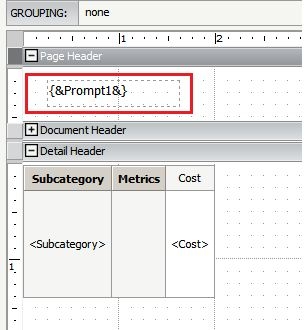
For Report Services Documents, add the auto text of {&Prompt1&} as shown below to display the first prompt answer:
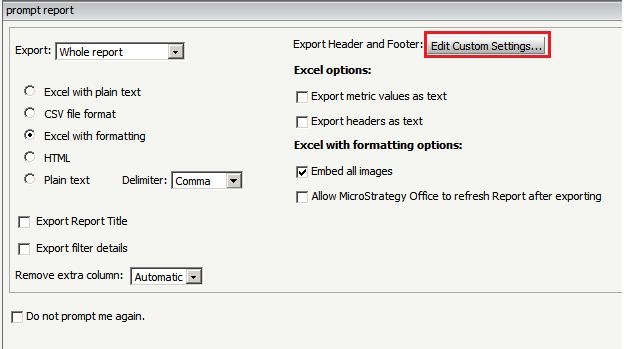
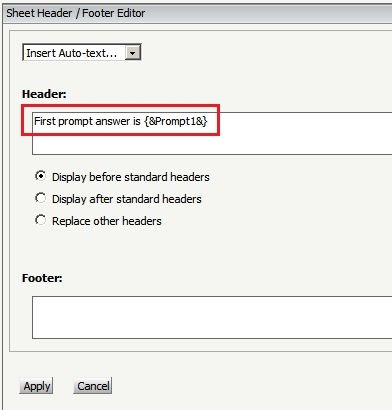
For reports, it is currently not supported to use Auto text in Developer. Users can export the report through Strategy Web and show part of the prompt answer in the exported file with the below steps:
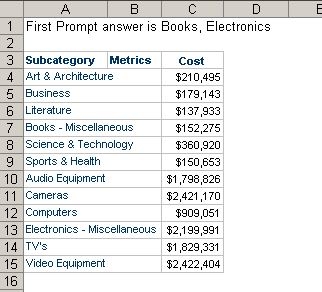
The exported file is shown below:
Note: The "Edit Custom Settings..." described above is report level setting. After changing the setting, save the report again to keep the setting for further usage.
Meanwhile, the below KB article also describes a method for formatting the section of filter detail to show part of prompt answer:
KB9311: How to display only a portion of a filter detail or a prompt answer in a Strategy 10.x Report Services Document.
39708
