** The following URL API request (to set default selectors) is only possible with a single selector. At this time, URL API does not support setting more then 1 selector's default value. **
The following example demonstrates how to construct URL API to run a Report Services document with different default selection for attribute element selector in Strategy Web 9.4.x-10.x:
(.NET Version) http://<web server>:port/MicroStrategy/asp/Main.aspx?
(JSP Version) http://<web server>:port/MicroStrategy/servlet/mstrWeb?

&evt=2048001
&src=Main.aspx.2048001
&documentID=F7ED3B8A4C338BFDDEF1458C91A0F9C2
&evt=2048084
&src=Main.aspx.rwd.rwframe.rwb.2048084
&ctlKey=W64
&elemList=h2;8D679D3711D3E4981000E787EC6DE8A4
&usePartDisplay=1
¤tIncludeState=true
&applyNow=1
&evtorder=2048001%2c2048084
&2048084=1
&2048001=1
&evt=2048001
&src=Main.aspx.2048001
&documentID=
&evt=2048084
&src=Main.aspx.rwd.rwframe.rwb.2048084
&ctlKey=
&elemList=
&usePartDisplay=
¤tIncludeState=
&applyNow=
&evtorder=2048001%2c2048084
&2048084=1
&2048001=1
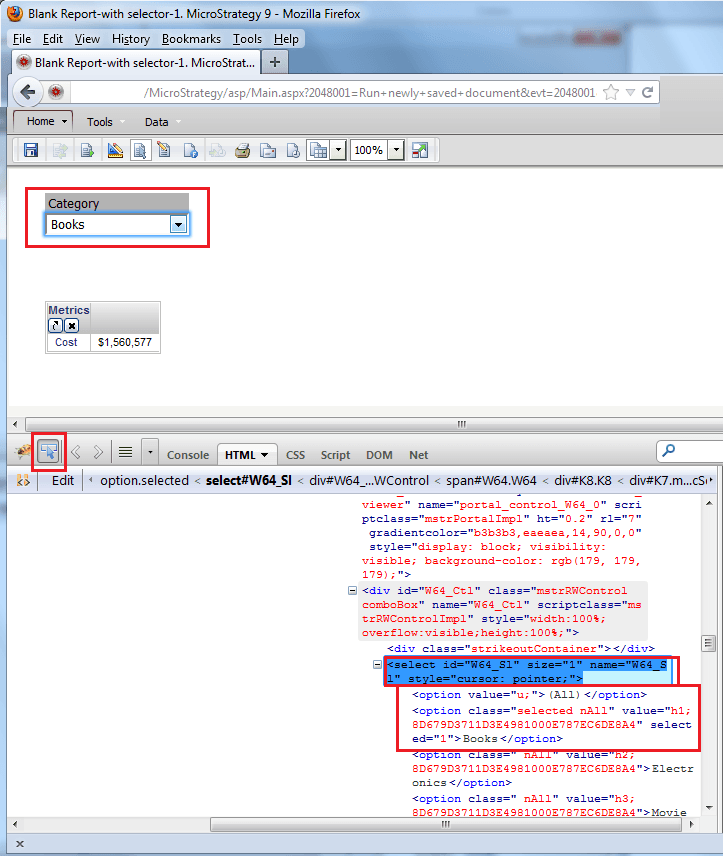
For information on how to do the same for grid selectors on target documents, to include how to find the &ctlKey &elemList parameters using Fiddler, refer to the following technical note:
KB43469: How to construct a URL API to run a Report Services document and set a specific selection for a Grid or Graph selector control in MicroStrategy Web 9.4.1
