EducationSoftwareStrategy.com
StrategyCommunity

Knowledge Base

Product

Community

Knowledge Base

TopicsBrowse ArticlesDeveloper Zone

Product

Download SoftwareProduct DocumentationSecurity Hub

Education

Tutorial VideosSolution GalleryEducation courses

Community

GuidelinesGrandmastersEvents
x_social-icon_white.svglinkedin_social-icon_white.svg
Strategy logoCommunity

© Strategy Inc. All Rights Reserved.

LegalTerms of UsePrivacy Policy
  1. Home
  2. Topics

KB414547: How to migrate groups along with their users and security roles across different metadatas using MicroStrategy Object Manager?


Community Admin

• Strategy


How to migrate groups along with their users and security roles across different metadatas using MicroStrategy Object Manager?

In Strategy Object Manager, when creating a configuration package for a user group, the users and security roles do not get brought into that package.  This is by design.  In order to be able to bring all three of these objects over the following procedure needs to be done.

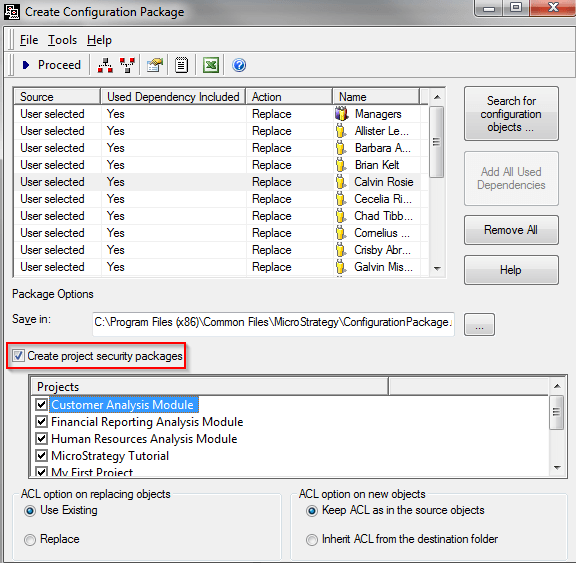
  • Create a configuration package for the user group(s) that should be brought over.
  • In the same package, add the users that are associated to this group.  To do this, in the package window select 'Search for configuration objects'.
ka0PW0000002ysvYAA_0EM440000002Cja.png
  •  
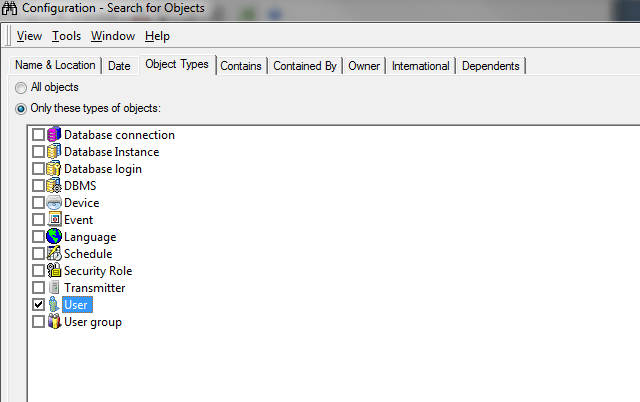
    In this search window, select 'User' in the Object Types tab and then go to the Dependents tab.  Have it set up as follows:
     
ka0PW0000002ysvYAA_0EM440000002CjU.png
  •  
    This will bring back all the users associated with this group.  Drag each one of these users into the package.
     
  • Select 'Create project security package' before continuing with creating the package.  Information on this can be seen in KB34475.  As this KB mentions, this does NOT bring over the security roles, just the link.  This will create a second package.
ka0PW0000002ysvYAA_0EM440000002CjY.png
  • After this package is created, create a new configuration package bringing over the security roles that are desired.

Now that the packages are created they will need to be imported in the following order:

  1. The package that contains the users and groups
  2. The package that contains the security roles
  3. Connect to the project and import the security package that was created with the user group and users


Comment

0 comments

Details

Knowledge Article

Published:

May 24, 2017

Last Updated:

August 12, 2024