EducationSoftwareStrategy.com
StrategyCommunity

Knowledge Base

Product

Community

Knowledge Base

TopicsBrowse ArticlesDeveloper Zone

Product

Download SoftwareProduct DocumentationSecurity Hub

Education

Tutorial VideosSolution GalleryEducation courses

Community

GuidelinesGrandmastersEvents
x_social-icon_white.svglinkedin_social-icon_white.svg
Strategy logoCommunity

© Strategy Inc. All Rights Reserved.

LegalTerms of UsePrivacy Policy
  1. Home
  2. Topics

KB41675: How to use a dynamic recipients list with a file subscription in MicroStrategy Distribution Services 9.3.0?


Community Admin

• Strategy


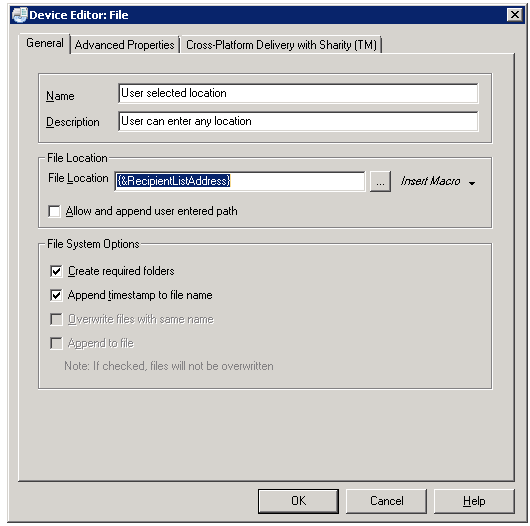
Under 'File Location' enter '{&RecipientListAddress}' as shown below and click OK

The following procedure describes how to use a dynamic recipient list for file subscriptions in Strategy Distribution Services.
 
Step 1. Refer to KB41561: How to setup dynamic address list for Distribution Services subscriptions in MicroStrategy 9.3.x and newer  to create a dynamic subscription list with the "File" attribute.  
 
Step 2. From Strategy Desktop, go to Administration > Delivery Managers > Devices, right-click on the File device and select edit.
 
Step 3. Under 'File Location' enter '{&RecipientListAddress}' as shown below and click OK.


ka04W000001481IQAQ_0EM4400000029gh.png


Comment

0 comments

Details

Knowledge Article

Published:

June 5, 2017

Last Updated:

June 5, 2017