SYMPTOM:
When performing an Enterprise Manager Dataload, the following error message may appear;
"The process cannot continue. The project that needs recovery is not loaded."
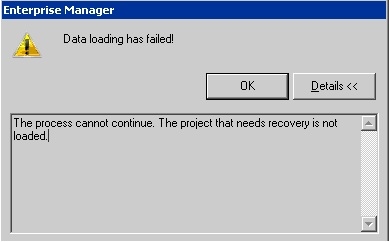
As well, the error will appear in the MSTRMigration.log file:

CAUSE:
This error can occur after an initial or recovery Enterprise Manager dataload. In order for this error to occur, a project source that is being reported on must be unable to connect to the Intelligence Server at the time of the dataload. This can also occur due to a DNS Server providing a value that is not resolvable for the Enterprise Manager Dataload.
ACTION:
Refer to the following Strategy Knowledge Base technical notes, for details on ensuring that the project source is properly configured for Enterprise Manager:
KB36645: "There is no project to transfer" and "Cannot load data from Project <Project Name>. This could be because the Project is unloaded, idle or was deleted" errors occur when attempting to perform a dataload in Strategy Enterprise Manager 9.x
KB37823: "Data loading has failed! There is no project to transfer; this could be because all the projects are unloaded, idle or deleted" error message appears when performing an Enterprise Manager data load in Strategy 9.x
