EducationSoftwareStrategy.com
StrategyCommunity

Knowledge Base

Product

Community

Knowledge Base

TopicsBrowse ArticlesDeveloper Zone

Product

Download SoftwareProduct DocumentationSecurity Hub

Education

Tutorial VideosSolution GalleryEducation courses

Community

GuidelinesGrandmastersEvents
x_social-icon_white.svglinkedin_social-icon_white.svg
Strategy logoCommunity

© Strategy Inc. All Rights Reserved.

LegalTerms of UsePrivacy Policy
  1. Home
  2. Topics

KB417751: In MicroStrategy Developer 2021, an attribute cannot be removed due to a hidden dependency to a transformation object


Stefan Zepeda

Salesforce Solutions Architect • Strategy


This knowledge base article describes an issue where user cannot remove an attribute and receives the following warning in MicroStrategy Developer 2021: Schema object '' cannot be deleted because the definition of other schema objects depend on it. Do you want to see a list of these dependent objects?
SYMPTOM:
The user cannot remove an attribute and receives the following warning in Strategy Developer 2021


Schema object '' cannot be deleted because the definition of other schema objects depend on it. Do you want to see a list of these dependent objects?


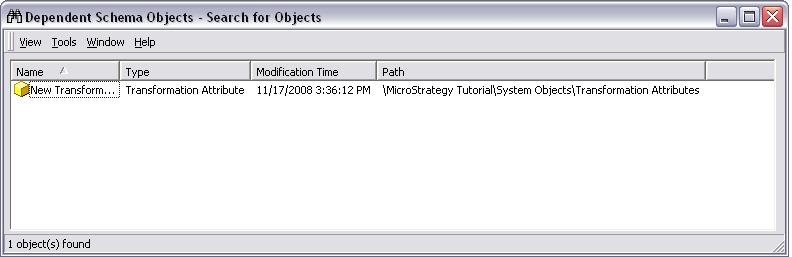
After the user clicks 'Yes', the search result returns a blank page. If the user has enabled hidden folders/objects, it will show dependency under System Objects folder as seen below:

ka0PW0000000dsbYAA_0EM440000002EhD.jpeg

Note: For more information on how to enable hidden folders/objects, refer to the following Strategy Knowledge Base technical note:
KB19828
KB19828: How to display hidden and invisible folders/objects in Strategy Developer 2021?
However, the user is not able to remove the dependency since it exists under System Objects folder.
 
CAUSE:
If an attribute object is used by a transformation object, there is no direct dependency between each others. Instead, there is a transformation attribute object created under System Objects folder to maintain the link between the attribute object and transformation object.
 
ACTION:
This is working as designed. To search which transformation object is using the attribute, take the following steps:

  1. Navigate to the folder where the transformation object is. By default, all transformation objects should be at: \ System Objects\Transformation Attributes.
    Note: Refer to KB19828 to make the 'System Objects' folder visible:
  2. Right click on the transformation attribute and search for components
  3. The search result should return the transformation object and its location. After the transformation object is removed, the attribute should be able to be removed as well.

This issue has been logged as TQMS ID: 336414 and  KB417751


Comment

0 comments

Details

Knowledge Article

Published:

May 29, 2017

Last Updated:

February 13, 2024