Parameterized queries are SQL queries written for re-usability and efficient performance. A typical example is the use of one bulk INSERT to avoid the costs associated with multiple INSERT statements. Strategy query engine supports the use of parameterized queries. This is done by going to Configuration Manager > Database Instance > Database Connection > Advanced and checking the box 'Use parameterized queries'. For further information on this functionality, refer to the Strategy Knowledge Base document KB5544 .
The Strategy ODBC Driver for Oracle Wire Protocol does not support the use of parameterized queries by default. This driver can be made to do so using one of the following options:
1) Check the box, 'Enable SQLDescribeParam' that is located in the 'Advanced' tab of the Data Source Name (DSN) setup as shown below:
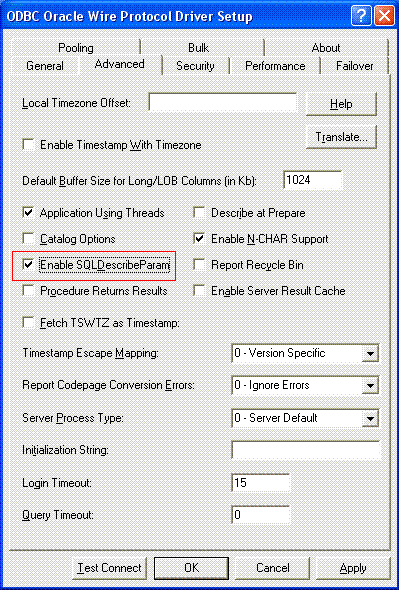
NOTE: The DSN for the Strategy ODBC Driver for Oracle Wire Protocol should always be created using the Strategy Connectivity Wizard. The above change can be made through the Microsoft ODBC Administrator after the DSN has been created using the Strategy Connectivity Wizard.
OR,
2) Insert 'EDP=1' in the ODBC connection string. In Strategy 9.x, additional parameters may be added to the ODBC connection string manually. These parameters can be specified at Configuration Manager > Database Instance > Database Connections > Advanced > Additional connection string parameters. For further details on setting additional connection string parameters, refer to the Strategy Knowledge Base KB42406 .
KB422708
