EducationSoftwareStrategy.com
StrategyCommunity

Knowledge Base

Product

Community

Knowledge Base

TopicsBrowse ArticlesDeveloper Zone

Product

Download SoftwareProduct DocumentationSecurity Hub

Education

Tutorial VideosSolution GalleryEducation courses

Community

GuidelinesGrandmastersEvents
x_social-icon_white.svglinkedin_social-icon_white.svg
Strategy logoCommunity

© Strategy Inc. All Rights Reserved.

LegalTerms of UsePrivacy Policy
  1. Home
  2. Topics

KB42629: When using Teradata as a warehouse in MicroStrategy 2021, a performance decrease is seen when a large number of rows are retrieved.


Community Admin

Placeholder •


Data transfer between MicroStrategy and Teradata is slow. The performance degradation is typically seen in Teradata while publishing Intelligent Cubes or when a large number of rows are returned to MicroStrategy from Teradata.

SYMPTOM:
Data transfer between Strategy and Teradata is slow. The performance degradation is typically seen in Teradata while publishing Intelligent Cubes or when a large number of rows are returned to Strategy from Teradata.
 
CAUSE:
The 'Max Response Buffer Size' parameter is not set for the Teradata ODBC connection.
 
ACTION:
The Teradata ODBC connection setting of 'Max Response Buffer Size' can be set in Strategy Desktop by following the below steps:
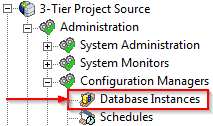
  • Connect to your 3-tier Project Source in Strategy
  • Open 'Administration' > 'Configuration Manager' > 'Database Instances':
ka0PW0000002xK9YAI_0EM440000002JEB.png
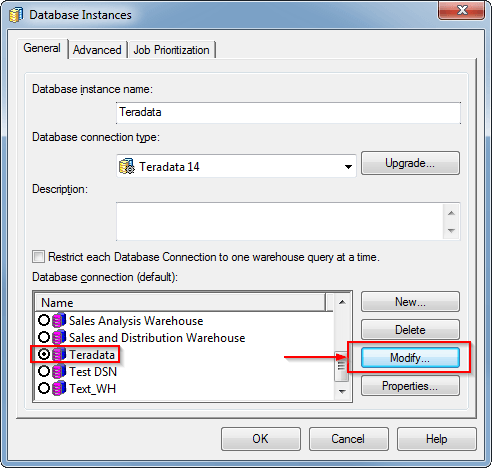
  • Edit an existing Teradata Database Instance and choose modify on the associated database connection:
ka0PW0000002xK9YAI_0EM440000002JEC.png
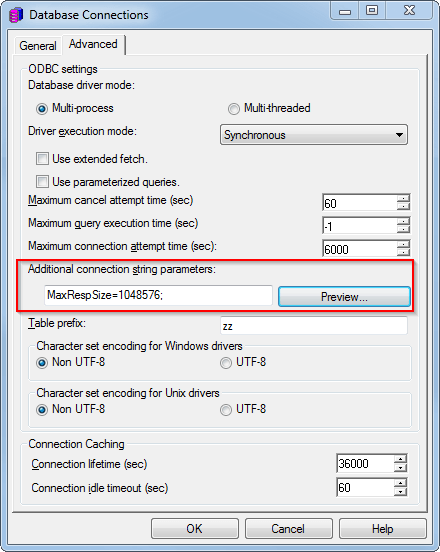
  • Navigate to the 'Advanced Tab' and input "MaxRespSize=1048576;" into the 'additional connection string parameters' field as shown below:
ka0PW0000002xK9YAI_0EM440000002JE8.png
  •  
    NOTE: 1048576 is the maximum value for this setting and also the recommended value.

As an alternative to the above steps, the 'Max Response Buffer Size setting can be applied directly on the Teradata ODBC Driver. If on Windows, the 'Max Response Buffer Size' is configured in the 'Teradata ODBC Driver Advanced Options' GUI as shown below:
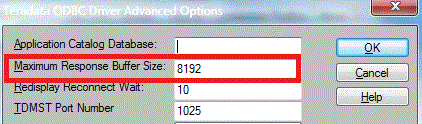
ka0PW0000002xK9YAI_0EM440000002JED.png

 
If on UNIX/Linux the ODBC.ini entry for Teradata ODBC Driver can be modified to have the following parameters:
Sample Code/Error
MaxRespSize=1048576
 
 
More information concerning the additional connection string parameters feature can be found in the following Strategy Technical note:
 
KB42620 - How does the Additional Connection String Parameters feature for database connections work in MicroStrategy 9.x? 


Comment

0 comments

Details

Knowledge Article

Published:

May 13, 2017

Last Updated:

June 16, 2025