EducationSoftwareStrategy.com
StrategyCommunity

Knowledge Base

Product

Community

Knowledge Base

TopicsBrowse ArticlesDeveloper Zone

Product

Download SoftwareProduct DocumentationSecurity Hub

Education

Tutorial VideosSolution GalleryEducation courses

Community

GuidelinesGrandmastersEvents
x_social-icon_white.svglinkedin_social-icon_white.svg
Strategy logoCommunity

© Strategy Inc. All Rights Reserved.

LegalTerms of UsePrivacy Policy
  1. Home
  2. Topics

KB42633: In MicroStrategy Web when exporting to CSV and selecting a delimiter other than comma, the CSV export always reverts to using comma delimiter.


Community Admin

• Strategy


In MicroStrategy Web when exporting to CSV and selecting a delimiter other than comma, the CSV export always reverts to using comma delimiter.

SYMPTOM:
 
When exporting to CSV from Strategy Web 9.3.0, the user can select the preferred delimiter. However, when selecting a delimiter other than comma, the CSV export reverts to using comma.
 
STEPS TO REPRODUCE:
 
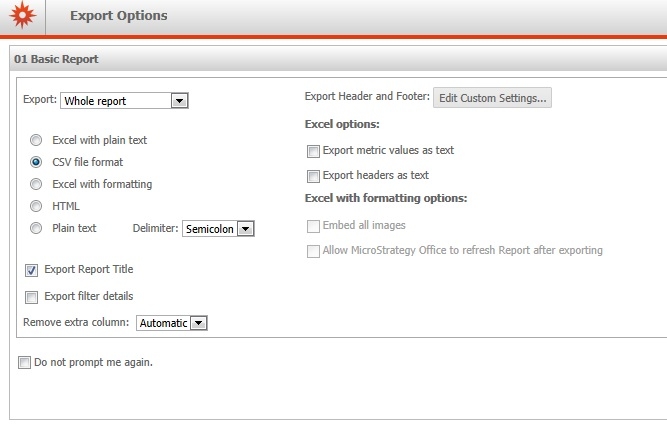
1. Execute a report and then export to CSV to show the export options:
 

ka04W00000148FsQAI_0EM4400000026oH.jpeg

 
2. Select a delimiter other than comma (e.g. semicolon).
 
3. Export to CSV
 
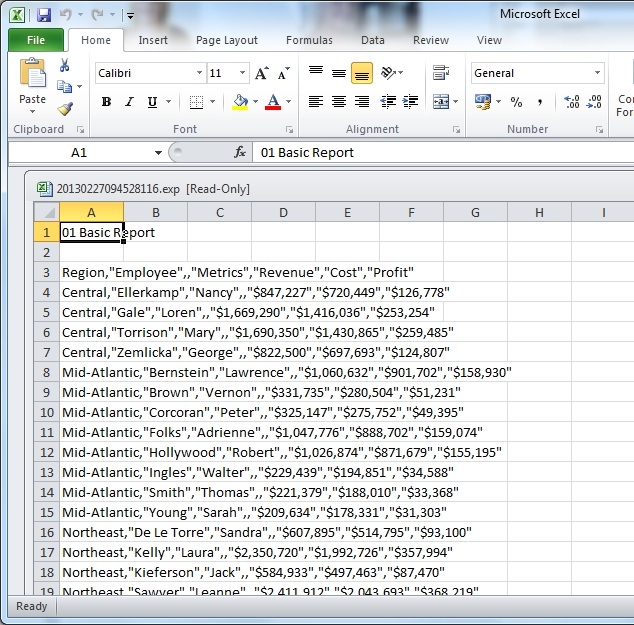
4. The CSV file does not use semicolon delimiters. It reverts to using commas:
 

ka04W00000148FsQAI_0EM4400000026oG.jpeg

 
CAUSE:
 
This is known issue with Strategy Web 9.3.0. In prior versions the CSV export took on the same delimiter values specified for Plain Text exports. This behaviour has changed with Strategy 9.3.0.
 
ACTION:
 
Strategy Technology team will share the update once this issue has been addressed.
WORKAROUND:
Refer to KB205012: Microsoft Excel Does Not Parse Individual Elements into Cells When Opening Reports Exported in .csv Format in MicroStrategy Web 9.4.1 and Later  and control the behavior of delimiter export result as suggested.


Comment

0 comments

Details

Knowledge Article

Published:

June 6, 2017

Last Updated:

February 13, 2018