Enabling Compatibility View Mode in Internet Explorer is not supported when using Strategy Web 9.x or 10.x. For more information, refer to tech note KB43020. This forces customers to disable this mode of browser functionality. However some users may still need to have it turned on for other web pages or resources other than Strategy Web 9.x/10.x. Microsoft Internet Explorer only provides a way to add certain individual websites to use compatibility view mode but does not offer a way to exclude certain websites so compatibility view mode can be turned on for all websites except one.
ACTION:
The following is a workaround in Internet Information Services (IIS), which forces any web application, in this case Strategy Web 9.x, to be viewed using IE 9 standards:
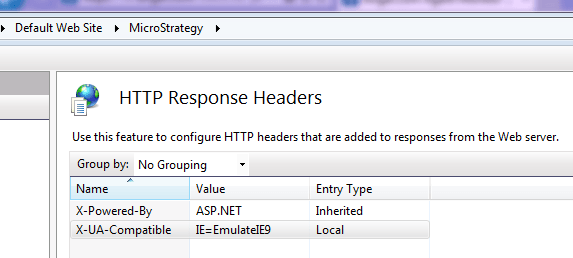
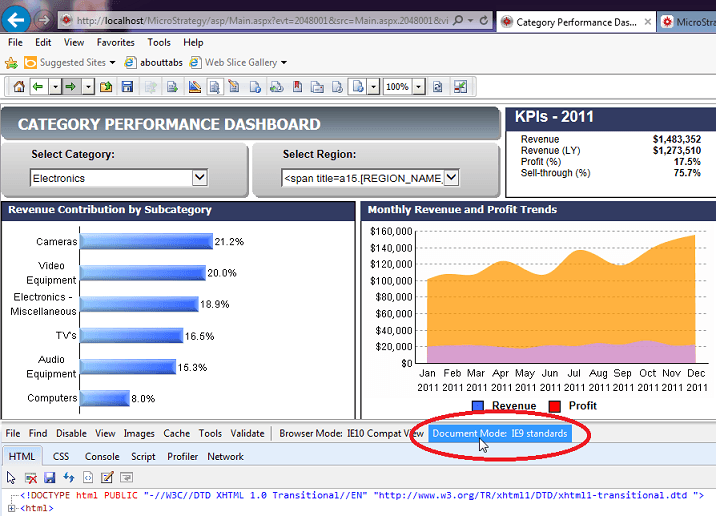
Now all websites should be using Compatiblitity View Mode ON except for the application where the above steps are configured.
Alternatively, the custom repsonse header can be added directly into the web.config file for Strategy Web. The following steps shows how to do this:
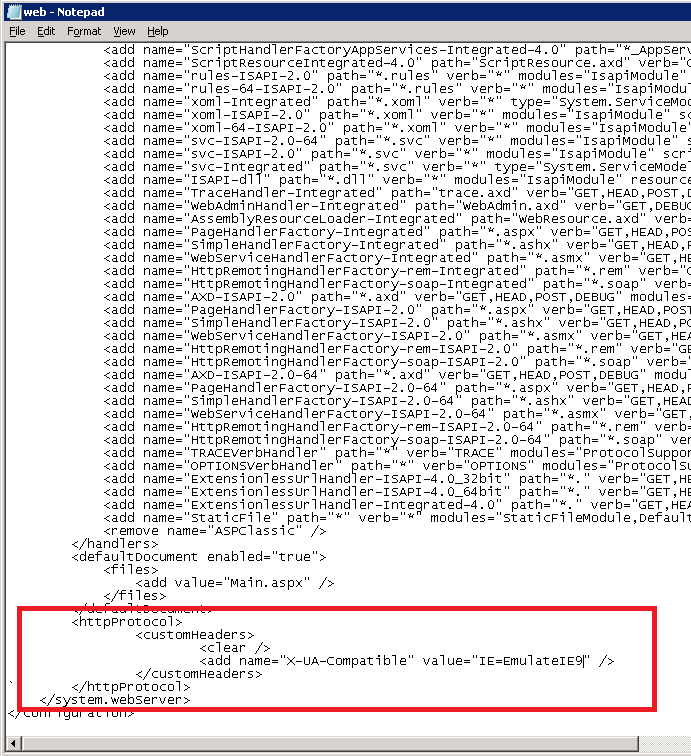
Refer to this resource in the MSDN for more information: http://msdn.microsoft.com/en-us/library/jj676915%28v=vs.85%29.aspx.
Important Note. The steps here will configure IIS7 to respond to requests to the Strategy Web application with the Standard Document Mode. However, the Browser Mode will still be in Compatibility Mode. The Browser Mode, different from the document mode, is a client-side configuration that sets how web sites should be handled. This property is conveyed to web servers via the User Agent String, which tells web servers what kind of browser is making a request for resources. The steps here will not change the Browser Mode, but the document mode, and the Browser Mode cannot be changed from making server-side modifications. Therefore, even after applying the workaround here, Strategy Web may still experience issues caused by the browser mode being in compatibility view mode overriding the document mode.
Please refer to this Microsoft resource for more information regarding the Browser Mode and the Document Mode.
http://blogs.msdn.com/b/ie/archive/2010/10/19/testing-sites-with-browser-mode-vs-doc-mode.aspx
WARNING:
The third-party product(s) discussed in this technical note is manufactured by vendors independent of Strategy. Strategy makes no warranty, express, implied or otherwise, regarding this product, including its performance or reliability.
