EducationSoftwareStrategy.com
StrategyCommunity

Knowledge Base

Product

Community

Knowledge Base

TopicsBrowse ArticlesDeveloper Zone

Product

Download SoftwareProduct DocumentationSecurity Hub

Education

Tutorial VideosSolution GalleryEducation courses

Community

GuidelinesGrandmastersEvents
x_social-icon_white.svglinkedin_social-icon_white.svg
Strategy logoCommunity

© Strategy Inc. All Rights Reserved.

LegalTerms of UsePrivacy Policy
  1. Home
  2. Topics

KB435922: How to troubleshoot issues with Microstrategy Enterprise Manager Data Loader Service


Community Admin

• Strategy


MicroStrategy Enterprise Manager Data Loader service is the service that needs to be running for scheduled MicroStrategy Enterprise Manager Dataload to run. This service is not the actual process that does the Dataload (i.e. move data to the warehouse tables). The most common issue with Microstrategy Enterprise Manager Data Loader are: • Enterprise Manager Service cannot be started • Enterprise Manager Service crashes during a data load

 
1. Enterprise Manager Service cannot be started
 

  • There should be only 1 EM service regardless of how many nodes are in the cluster. Make sure we have only 1 EM service running
  • Check that the DSN configured on EM service is valid and that the credentials used on service manager are correct
  • Check the version of Enterprise Manager


EM versions 10.0 – 10.1 would not start if there are failed data loads in the EM_IS_LAST_UPDATE table. See KB268204

  • Try to start the EM Service from Command line to get the detailed error message (on Windows):
ka04W00000148awQAA_0EM44000000A3HJ.png

On Linux:
/<MSTR_INSTALL_DIR>/install/bin/MSTRExec -w /<MSTR_HOME_DIR>/EnterpriseManager -t status-emservice.xml /<MSTR_INSTALL_DIR>/install/lib/libMSTREMService.so –noconsole
Example start-up error:
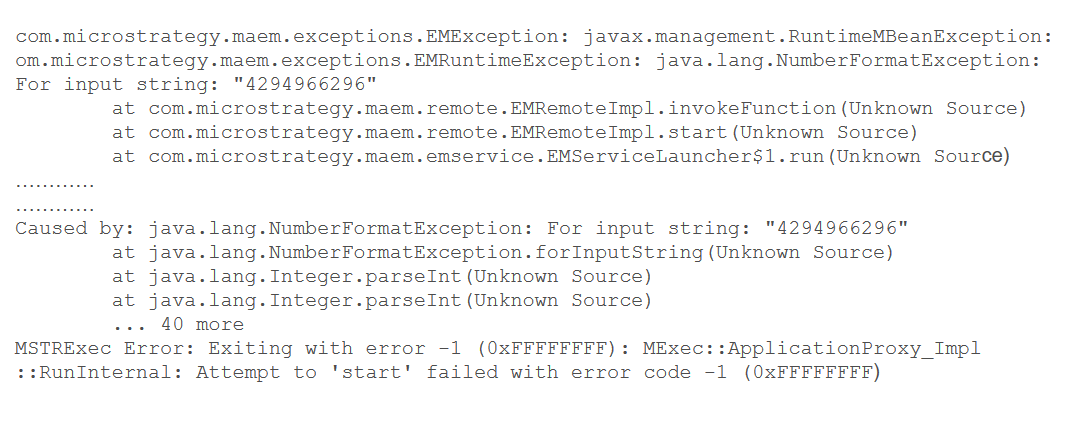
ka04W00000148awQAA_0EM44000000A3HO.png

If all these things do not help we need to activate additional login called verbose logging (The logs files get generated in the command window). Please have a look at this KB to see how to enable it (we should use the process MSTREMService.exe in this situation).
https://community.strategy.com/article/KB19416-How-to-turn-on-verbose-logging-for-the-MicroStrategy
 
"C:\Program Files (x86)\Strategy\Enterprise Manager\MSTREMService.exe" -vvv "C:\Program Files (x86)\Strategy\Enterprise Manager\MSTREMService.dll"
Linux
/<MSTR_HOME_DIR/bin/mstrexec-emservice -vvv
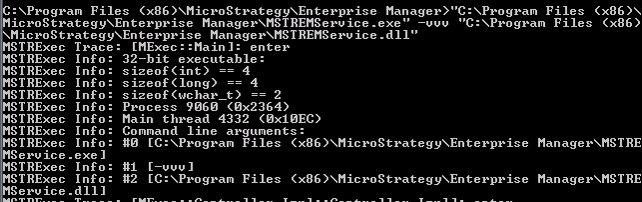
ka04W00000148awQAA_0EM44000000A3HT.png

2. Enterprise Manager Service crashes during a data load
 

  • Disable MultiProcess mode for the EM service (Implement the steps from KB289904 on the EM machine)
  • Clean the failed DL from EM_IS_LAST_UPDATE and Truncate the EM_RECOVERY table and try restarting service
  • Try starting the service again and if it cannot start or crashes during start up, we need to collect the verbose logging

  KB435922


Comment

0 comments

Details

Knowledge Article

Published:

March 13, 2018

Last Updated:

August 1, 2018