SYMPTOM:
Users experience intermittent slow response times through out the day when attempting to open the Strategy Web home page when running on Microsoft IIS 7 More specifically, the very first request of the day will be slow, while all other requests will be fast. Then again later in the day another request will be slow again, and then all others will be fast again.
CAUSE:
One possible cause of this issue is that there is a substantial idle time between user's activity. Microsoft IIS 7 drops the worker process if it is inactive for a period of time on any application pool. When the worker process recycles, it is in effect flushing all of the Strategy application and session information from the Web Server's memory, in which case all of the Strategy application and session information are flushed from the Web Server's memory. By default, IIS recycles the worker process after an idle time of 20 minutes and every 1740 minutes (29 hours).
Note: It takes longer for the first request because the application server is loading the application into memory after the recycling of the application pool IIS. This behavior is not unique to Strategy. Any .Net application loaded on an IIS 7 web application server would behave the same way if the worker process assigned to that application pool was recycled.
ACTION:
follow the steps below in order to resolve this issue:
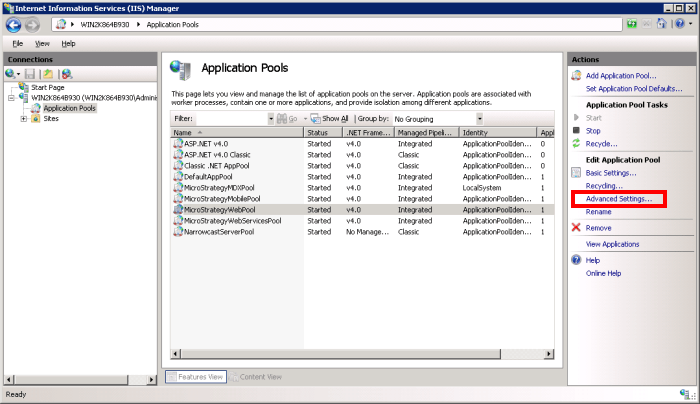
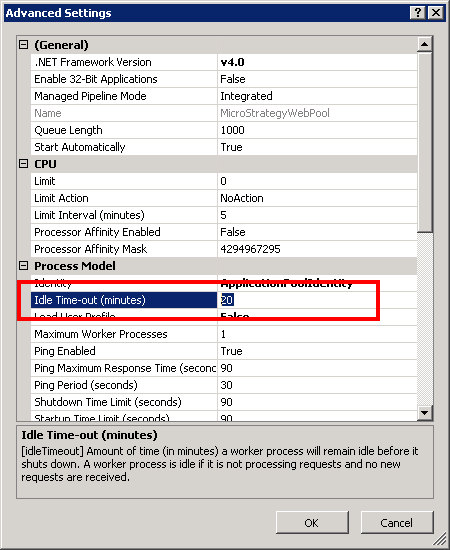
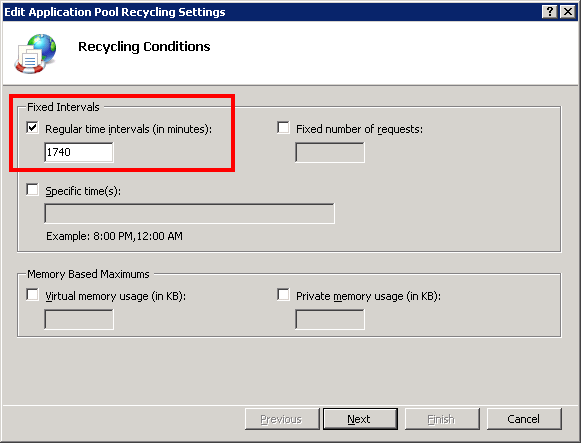
Note: When running IIS 6.0 on Windows 2003, refer to technical note. KB11370 - Users experience intermittent slow response times when attempting to open the MicroStrategy Web home page when using IIS 6.0.
WARNING:
The third-party product(s) discussed in this technical note is manufactured by vendors independent of Strategy. Strategy makes no warranty, express, implied or otherwise, regarding this product, including its performance or reliability.
