EducationSoftwareStrategy.com
StrategyCommunity

Knowledge Base

Product

Community

Knowledge Base

TopicsBrowse ArticlesDeveloper Zone

Product

Download SoftwareProduct DocumentationSecurity Hub

Education

Tutorial VideosSolution GalleryEducation courses

Community

GuidelinesGrandmastersEvents
x_social-icon_white.svglinkedin_social-icon_white.svg
Strategy logoCommunity

© Strategy Inc. All Rights Reserved.

LegalTerms of UsePrivacy Policy
  1. Home
  2. Topics

KB439198: The modification of the Date prompt from Prompt Editor is not applied in the Report


Yating (Tiffanie) Zhai

Senior Cloud Support Engineer III • MicroStrategy


The modification of the Date prompt from Prompt Editor is not applied in the Report which is using this prompt.

SYMPTOM
From Strategy Developer, the modification of the Date prompt from Prompt Editor is not get applied in the report c ontains this prompt.
STEPS TO REPRODUCE

  1. Create a Value prompt (Date), and set the default value as Dynamic date (for example, Today-365 days).
  2. Create a Report and add the Date prompt created in Step 1. The report data is showing correct.
  3. Go back to edit the Date Prompt, change the default value from Dynamic date (Today-365 days) to Static date,  and save.
  4. Purge the object cache and report cache.
  5. Run the report. The default value is still the Dynamic date (Today-365 days). By checking the GUID and version ID of the Date Prompt from the Report components, it is confirmed that it is the changed prompt, but the change is not applied.

CAUSE
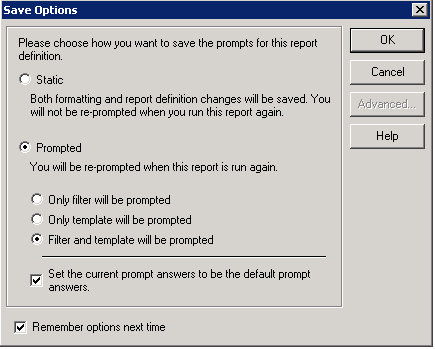
This is caused by the option "Set the current prompt answers to be the default prompt answers" which has been enabled in save options, so even user changes the prompt default answer from prompt editor, the current answeris still the default answer in this report as this option is checked.
ka02R000000kV6oQAE_0EM44000000QBEN.png

ACTION
Uncheck the option "Set the current prompt answers to be the default prompt answers" from save options, and the change for the date prompt will get applied.
  KB439198


Comment

0 comments

Details

Knowledge Article

Published:

December 27, 2017

Last Updated:

November 14, 2018